Posera - AI Posing Camera

Posera - AI Posing Camera Summary
Posera - AI Posing Camera is a free, ad-supported, with in-app purchases iOS app in Entertainment by Trang Vu Thuy. Released in Jul 2026 (2 months ago). Store last updated Aug 11, 2026
Posera - AI Posing Camera SDKs Summary
App not yet scanned for SDKs.
0★
Ratings: 0
Screenshots


App Description
Posera is your AI posing coach. Pick a pose, line up the silhouette on your live camera, hold until the joints turn lime — that's your shot. No photographer. No retakes.
MAIN CHAR ENERGY, EVERY SHOT
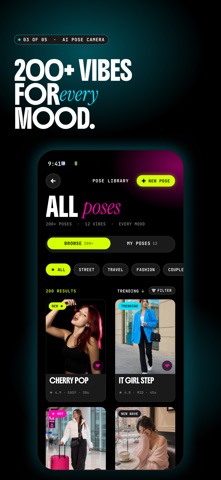
Browse 200+ starter poses across Street, Travel, Fashion, Couple, and Wedding — plus editorial drops tagged TRENDING, HOT, GOLDEN, DREAMY, CAFÉ, BOLD, CHILL, and SUMMER. Filter by category, difficulty, and duration to find the right pose for the moment.
LIVE AI ALIGNMENT — JOINT BY JOINT
Posera uses Apple's on-device Vision framework to track 19 body joints in real time. The AI Align card shows your match score 0–100%. The joint panel calls out each part — Neck, Hands, Body, Legs — with its own bar, so you know exactly which limb to move.
PHOTO OR VIDEO, WITH THE OVERLAY ALWAYS ON
Photo mode: tap shutter, capture HEIF still. Video mode: tap record, save up to 60 seconds of .mov (HEVC + AAC audio). The silhouette overlay and AI Align stay live across both. Toggle aspect ratio 1:1 / 3:4 / 9:16 to match the platform you post to.
AUTO-CAPTURE — HANDS-FREE
Turn on the AI mode pill and Posera snaps the photo when you hold the pose at threshold (75 / 80 / 85 / 90 — your call) for the hold time you set (0.3 / 0.5 / 1.0s). Optional 3 / 5 / 10 second timer countdown with full-screen overlay. Manual shutter always available.
AI POSE EXTRACT — MAKE YOUR OWN POSE
Open POSE → My Poses → MAKE YOUR OWN POSE. Pick any portrait from your library. In ~2 seconds Posera extracts the pose, builds a silhouette template, and saves it to your library. The whole pipeline runs on-device — no upload, ever.
PHOTO EDITOR — 16 FILTERS, 4 ADJUSTMENTS
After capture, fine-tune with the 16-preset library: Vibrant (Vivid, Pop, Chrome), B&W (Mono, Noir, Silvertone), Film (Fade, Instant, Transfer, Sepia), Cool (Cool, Arctic), Warm (Golden, Sunset), Portrait (Soft) — plus Original. Per-filter intensity slider. Adjust brightness, contrast, saturation, and warmth. Live preview via Metal.
GALLERY — SANDBOX-FIRST
All captures land in the in-app gallery first (Documents/Captures/), then optionally copy to Photos with your add-only permission. Browse as a 3-column masonry grid, filter All / Video / Image, long-press to multi-select share or delete. Auto-prune after 30 / 60 / 90 days, your choice.
DRESS YOUR APP
Three alt app icons ship in v1.0 — Lime, Pink, and