Welcome Screens

Welcome Screens Summary
Welcome Screens is a free iOS app in Tools by 向龙 卢. Released in Jun 2026 (4 months ago). Store last updated Oct 5, 2026
Welcome Screens SDKs Summary
App not yet scanned for SDKs.
0★
Ratings: 0
Screenshots


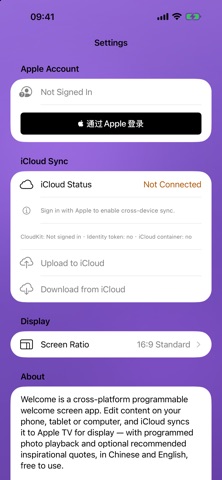


App Description
Welcome turns your Apple TV into a full-screen welcome display for home, the office, trade shows and presentations.
Set everything up on iPhone, iPad or Mac, then open Welcome on Apple TV with the same iCloud account. Your titles, backgrounds and photo playlists sync over iCloud and play on the TV.
WHAT YOU CAN SHOW
• A custom welcome screen with title, subtitle, body text, colors or a photo background
• Programmed Playback: photo groups with order, loop count, duration and how long each image stays on screen
• Daily inspirational quotes when you have not uploaded custom content
• Chinese and English
ON APPLE TV
• Full-screen display sized for the TV
• Press the iCloud button (lower right) to download what you set up on iPhone, iPad or Mac; in cloud mode it refreshes about once a minute
• Press the sparkles button (lower left) to switch back to local daily recommendations
• Photos play in the order and timing you chose. If an image is still downloading, the TV shows progress and continues instead of getting stuck
• Photos are shown in full, without cropping
GETTING STARTED
1. Install Welcome on iPhone, iPad or Mac and on Apple TV
2. Sign in to the same iCloud account on every device
3. Edit the welcome screen or enable Programmed Playback, then tap Apply and wait until photos finish uploading to iCloud
4. Open Welcome on Apple TV and press the iCloud button
Sign in with Apple is available for in-app account management. Cross-device sync uses your system iCloud account. Welcome is free to use.
Support: Klas.lu@qq.com