HuanJing Emu: Clearer Classics

HuanJing Emu: Clearer Classics Summary
HuanJing Emu: Clearer Classics is a free, ad-supported iOS app in Tools by 衡祁 蒋. Released in Nov 2026 (recently released ago). It has 2.00 ratings with a 5.00★ (excellent) average. Based on AppGoblin estimates, it reaches roughly 100 monthly active users and generates around $<10K monthly revenue (0% IAP / 100% ads). Store last updated Nov 20, 2026
Recent activity: 2.00 new ratings this week View trends →
HuanJing Emu: Clearer Classics SDKs Summary
App not yet scanned for SDKs.
5★
Ratings: 2.00
Screenshots


App Description
HuanJing Emu is an emulator: import game files you own and play them on iPhone and iPad.
HuanJing Ultra Quality
Old games run at very low resolutions, and on a modern screen their pixels turn into a blur. Turn on HuanJing Ultra Quality and AI redraws the picture as you play. Edges look cleaner, colors look smoother, and small text is easier to read.
It works with GB, GBC, GBA, NDS, NES, SNES, Genesis, Sega CD, Pico, PSP, PS1, N64, and arcade games. Open a game and the switch is right there, or turn it on in Settings → Graphics. There is nothing extra to download, and it works offline.
3DS, PS2,PSVita, Wii, Wii U, GameCube, Dreamcast, and NDS play smoothly even at higher internal resolutions.
These systems are demanding. We optimized them specifically for iPhone and iPad, so on recent devices you can import a game and play it smoothly. No computer or extra tools needed.
Continue on another device
Cloud progress keeps each game's saves and save states in your own iCloud. You can also use Google Drive, Baidu Netdisk, WebDAV, or SMB. When two devices have different progress, the app asks which one to keep instead of overwriting it.
Share a game with its saves
Pack a game together with its saves, cheats, and cover, then send it with AirDrop, the share sheet, or over the same Wi-Fi. Open it on the other device and keep playing.
Adjust each game on its own
Drag to move and resize the game picture and the on-screen buttons. The layout is saved for that game only.
Extras on some systems
On GBA and NDS you can move the in-game clock forward, so you don't have to wait for night to fall or for crops to grow. When an NDS game asks you to blow into the microphone, hold the blow button on screen instead. You can also close and open the lid. Wii offers six controller types, and some of them let you aim by turning your phone.
Everyday features
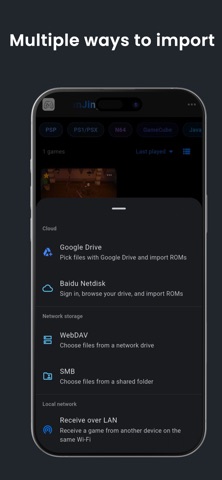
You get save states, speed control, and screenshots. Many games come with built-in cheats, and you can add your own. Bluetooth controllers and keyboards work, and you can remap the buttons. NES, SNES, Genesis, and arcade games support two-player play on two devices over the same Wi-Fi. Import games from the Files app, cloud drives, or another device on the same Wi-Fi.
Supported systems
GB, GBC, GBA, NDS, 3DS, NES, SNES, N64, GameCube, Wii, Wii U, Virtual Boy, PSP, PS1, PS2,PSVita, Genesis/Mega Drive, Sega CD, 32X, Master Sys
Data also available via the AppGoblin MCP and API (/api/v1/apps/{store_id}).