VisuCraft

VisuCraft Summary
VisuCraft is a free, with in-app purchases iOS app in Tools by ERDEM GULEN. Released in Jul 2026 (2 months ago). It has 2.00 ratings with a 5.00★ (excellent) average. Based on AppGoblin estimates, it reaches roughly 20 monthly active users and generates around $<10K monthly revenue (100% IAP / 0% ads). Store last updated Jul 14, 2026
VisuCraft SDKs Summary
App not yet scanned for SDKs.
5★
Ratings: 2.00
Screenshots
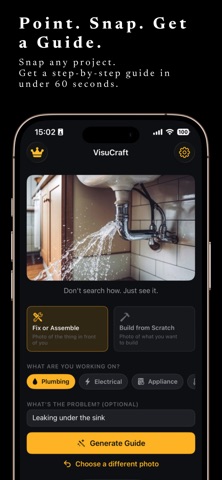


App Description
VisuCraft turns any photo into a step-by-step repair or build guide — no searching, no videos, no guesswork.
Point your camera at anything — a leaking faucet, a rattling appliance, a flat-pack furniture kit, a car engine — and VisuCraft reads the scene and generates a personalized blueprint in seconds. No templates. No generic YouTube tutorials. Just the exact guide for what's actually in front of you.
WHAT YOU GET
• Annotated step-by-step guide — every step is overlaid directly on your captured photo with highlighted callouts, measurement markers, and numbered pins so you always know exactly where to look.
• AI diagnosis first — describe your symptom ("leaking under the sink," "tripping the breaker") and VisuCraft leads with a diagnosis before the fix, so you're solving the right problem every time.
• Full parts breakdown — an IKEA-style exploded view identifies every part and links it to a shopping search so you can source what you need without leaving the app. Pro adds a clean catalog-style illustration for every part.
• Printable PDF manual — every guide generates a professional, shareable PDF you can print, text to a family member, or keep for next time.
• Watch mode — each guide becomes a narrated cartoon walkthrough: a hand-drawn sketch for every step, read aloud while your hands stay on the work. No phone watching required.
• Step Check-In — snap a checkpoint photo after each step and VisuCraft's AI looks at what you did and confirms you're ready to move on. Mis-tightened bolt? Wrong side panel? It will catch it.
• AI Mechanic / Carpenter — a grounded chat assistant that knows your exact guide. Ask "what if my pipe is copper?", ask it to convert measurements to metric, ask it to simplify a step — it can even rewrite the guide in real time.
• Save and track — every guide stays in your on-device library. Progress bars show how far you've gotten, and you can pick back up exactly where you left off.
WORKS ON
Plumbing · Electrical · Appliances · Heating & Cooling · Doors & Windows · Furniture · Home Improvement · Exterior & Yard · Automotive · Electronics · Model Kits
HOW IT WORKS
1. Point your camera at the project (or import from your Photos library).
2. Select a category and — for repairs — describe the symptom.
3. Tap "Generate Guide" and wait about 60 seconds.
4. Follow the annotated p