TimeLog: Time Budget & Tracker

TimeLog: Time Budget & Tracker Summary
TimeLog: Time Budget & Tracker is a free, with in-app purchases iOS app in Productivity by 筱彤 余. Released in Jul 2026 (1 month ago). It has 1.00 ratings with a 5.00★ (excellent) average. Based on AppGoblin estimates, it reaches roughly 9.00 monthly active users and generates around $<10K monthly revenue (100% IAP / 0% ads). Store last updated Aug 10, 2026
TimeLog: Time Budget & Tracker SDKs Summary
App not yet scanned for SDKs.
5★
Ratings: 1.00
Screenshots




App Description
TimeLog turns vague feelings about your time into clear data. Plan first, log as you go, then reflect — so every minute goes to what matters.
PLAN YOUR TIME
Set time budgets by year, month, week, or day. Give each category a target and decide where your hours should go before the week even begins.
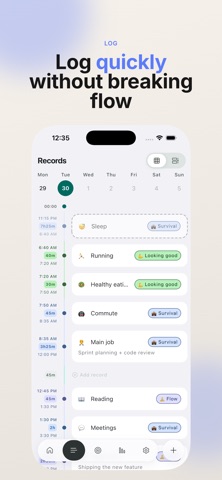
TRACK WITHOUT BREAKING FLOW
Start a timer in a single tap, or add time later by hand. Quick, frictionless logging keeps every minute traceable without pulling you out of deep work.
REFLECT WITH REAL NUMBERS
Review budget completion, time share across categories, and long-term trends. See the gap between plan and reality, and learn what actually paid off.
WHY TIMELOG
• Budget-first approach — direction before tracking
• One-tap timers and manual entry
• Clear stats: completion rate, time share, trends
• Clean, focused design that stays out of your way
• Your data syncs privately across your devices
Make your time visible. Start planning with TimeLog today.
———
SUBSCRIPTION & PRICING
TimeLog Premium unlocks every Pro feature. Choose what fits you:
• Premium Monthly — auto-renewing monthly subscription
• Premium Yearly — auto-renewing yearly subscription (best value)
• Lifetime — one-time purchase, not a subscription
Prices are shown in the app and may vary by region. Payment is charged to your Apple ID account at confirmation of purchase. Subscriptions renew automatically unless auto-renew is turned off at least 24 hours before the end of the current period; your account is charged for renewal within 24 hours before the period ends. If a free trial is offered, any unused portion is forfeited once you subscribe. You can manage or cancel anytime in your App Store account settings.
Terms of Use: https://uxsyr9xrl46.feishu.cn/wiki/GW3HwV7juizlEmkCSIvcumUKnXc
Privacy Policy: https://uxsyr9xrl46.feishu.cn/wiki/JcpwwaxGxioNmRkp3kMcsO7inLf