PDF Editor ™

PDF Editor ™ Summary
PDF Editor ™ is a free, with in-app purchases iOS app in Business by Appios Bilisim. Released in Jul 2026 (4 months ago). It has 28 ratings with a 3.96★ (average) average. Based on AppGoblin estimates, it reaches roughly 391 monthly active users and generates around $<10K monthly revenue (100% IAP / 0% ads). Store last updated Oct 12, 2026
Recent activity: 1.00 new ratings this week View trends →
PDF Editor ™ SDKs Summary
App not yet scanned for SDKs.
3.96★
Ratings: 28
Screenshots


App Description
PDF Editor – Edit, Convert, Sign & Scan PDF
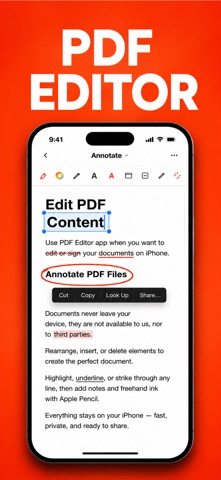
Take full control of your PDF documents with an easy-to-use editor designed for work, school, and everyday tasks. Edit text, organize pages, fill forms, sign documents, convert files, and annotate PDFs—all from your iPhone or iPad.
Whether you're reviewing contracts, completing forms, studying, or managing business documents, PDF Editor provides the essential tools you need in one place.
Edit PDFs
• Edit PDF text
• Add or remove text
• Insert images
• Highlight, underline, and strike through
• Add comments and notes
• Draw with Apple Pencil or finger
Read & Manage Documents
• Open PDF files instantly
• Bookmark important pages
• Search inside documents
• Dark mode support
• Organize files with folders
• Rename, duplicate, and share documents
Convert Files
• Image to PDF
• JPG to PDF
• PNG to PDF
• Word to PDF
• Excel to PDF
• PowerPoint to PDF
• PDF to Image
Scan Documents
• Scan paper documents
• Auto edge detection
• Smart cropping
• High-quality PDF output
• Multi-page scanning
Fill & Sign
• Fill PDF forms
• Create handwritten signatures
• Sign contracts and agreements
• Save reusable signatures
Organize PDFs
• Merge PDF files
• Split PDF documents
• Rearrange pages
• Rotate pages
• Delete pages
• Extract pages
Compress & Protect
• Compress large PDFs
• Password protect files
• Unlock supported PDFs
• Secure document sharing
Perfect for:
• Students
• Business professionals
• Remote workers
• Teachers
• Freelancers
• Anyone who works with PDF documents
Download PDF Editor today and simplify the way you read, edit, convert, sign, and manage PDF files.
Information About Subscription
You can cancel your subscription or free trial anytime by cancelling your subscription through your iTunes account settings, or it will automatically renew. This must be done 24 hours before the end of the free trial or any subscription period to avoid being charged. Subscription with a free trial period will automatically renew to a paid subscription. Please note: any unused portion of a free trial period (if offered) will be forfeited when you purchase a premium subscription during the free trial period.
Subscription payments will be charged to your iTunes account at confirmation of your purchase and upon commencement of each