Next Calendar

Next Calendar Summary
Next Calendar is a mobile iOS app in Tools by Zachary Visco. Released in Jul 2026 (1 month ago). It has 2.00 ratings with a 5.00★ (excellent) average. Based on AppGoblin estimates, it reaches roughly 62 monthly active users . Store last updated Jul 23, 2026
Next Calendar SDKs Summary
App not yet scanned for SDKs.
5★
Ratings: 2.00
Screenshots

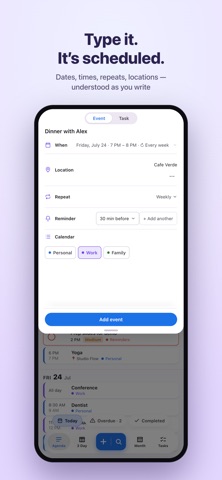


App Description
“What’s next?”
Next always has the answer. It’s a fast, private calendar and to-do app for iPhone and Mac that puts your events and tasks in one place — and understands plans the way you actually say them.
TYPE IT. IT’S SCHEDULED.
“Lunch with Sam 1pm Friday.” “Gym every Tuesday at 6.” “Call Mom Sunday.” Next reads dates, times, repeats, lists, and locations as you type, shows a live preview, and files everything exactly where it belongs.
ONE LIST FOR YOUR WHOLE DAY
Meetings and errands don’t live in separate apps in your head. Next puts events and to-dos on the same agenda — with 3-Day and Month views for the bigger picture, and a Tasks board you can group by date, list, or priority.
WORKS WITH WHAT YOU HAVE
Next reads and writes your built-in Calendar and Reminders, so iCloud, Google, and Outlook show up instantly. No account to create. No import. Your Mac and iPhone stay in sync through the accounts you already use.
YOUR DAY IS NONE OF OUR BUSINESS
No servers. No analytics. No tracking. Everything stays on your device, in the Calendar and Reminders you already trust.
AND THE DETAILS
Long-press any item to snooze, complete, edit, or delete
Reminders that fire on time — even with the app closed
A widget that always knows what’s next
Light and dark, drawn in your real calendar colors
Fast keyboard entry on Mac, real haptics on iPhone
Know what’s next.