PixelForge - Text to Image AI

PixelForge - Text to Image AI Summary
PixelForge - Text to Image AI is a free, with in-app purchases iOS app in Photo And Video by Rizwan Rashid. Released in Jul 2026 (1 month ago). Store last updated Aug 13, 2026
PixelForge - Text to Image AI SDKs Summary
App not yet scanned for SDKs.
0★
Ratings: 0
Screenshots




App Description
Turn your words into stunning AI-generated images — instantly, and completely free.
PixelForge is a clean, fast, no-clutter AI art studio built for people who actually want to create — not fight with a confusing app. Type what you imagine, adjust a few simple settings, and watch it come to life. Generate one image or a whole batch of variations at once, then keep everything organized in your own private history, right on your device.
WHY PIXELFORGE
- Batch Generation — Create up to 8 variations of the same idea in one tap, instead of generating one image at a time like most apps.
- Full Creative Control — Choose your image size (square, portrait, story, landscape, or fully custom dimensions), pick a model, lock a seed for reproducible results, or let the AI enhance your prompt automatically.
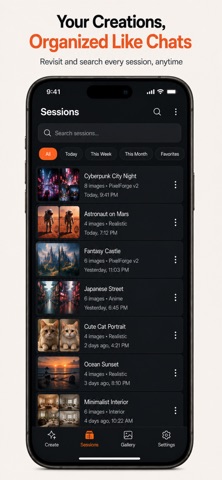
- Your Sessions, Saved Like Chats — Every prompt and every result is organized into sessions you can revisit, search, and pick back up later — just like a conversation history.
- Never Lose a Generation — Failed image? Retry it instantly with one tap, no need to retype your prompt or lose your place.
- 100% Local & Private — Your history, prompts, and generated images stay on your device. No account, no login, no cloud upload required.
- Clean, Distraction-Free Design — No clutter, no confusing menus, no intrusive ads interrupting your flow — just a fast, focused way to create.
- Completely Free to Use — No subscription required to start generating.
WHO IT'S FOR
Whether you're designing a wallpaper, exploring concept art, creating a thumbnail, prototyping an idea, or just turning a fun thought into a picture, PixelForge gives you a simple, powerful way to go from words to image in seconds.
HOW IT WORKS
1. Type a description of the image you want.
2. Choose your size, style, and settings (or just use the smart defaults).
3. Generate one image or a full batch of variations.
4. Save, favorite, share, or revisit anything from your history — anytime, even offline.
Download PixelForge and turn your imagination into images today.
Privacy Policy : https://sites.google.com/view/pixel-forge-privacy-policy/home
https://www.apple.com/legal/internet-services/itunes/dev/stdeula/