Compress PDF - PDF Compressor

Compress PDF - PDF Compressor Summary
Compress PDF - PDF Compressor is a free, ad-supported, with in-app purchases iOS app in Productivity by Muhammad Awais Younas. Released in Jul 2026 (2 months ago). Store last updated Aug 28, 2026
Compress PDF - PDF Compressor SDKs Summary
App not yet scanned for SDKs.
0★
Ratings: 0
Screenshots



App Description
Compress PDF — Shrink File Size, 100% On Your Device
Is a PDF too large to email, upload, or submit? Compress PDF reduces file size
in seconds, right on your iPhone or iPad — without ever sending your document
to a server.
COMMON PROBLEMS THIS SOLVES
- An application portal rejects your file for exceeding its size limit
- A form, registration, or submission system caps uploads at a few MB
- Your email provider blocks large attachments
- A scanned document or photo-heavy PDF is taking up way too much storage
- You just want a faster, lighter file to share
If any of that sounds familiar, Compress PDF fixes it in a few taps.
100% OFFLINE — NOTHING IS EVER UPLOADED
Unlike most PDF compressor apps, which quietly send your files to a server to
process them, Compress PDF works entirely on-device. Your contracts, IDs,
scans, and personal documents never leave your phone. No account, no sign-up,
no cloud dependency — just fast, private compression, even with no internet
connection.
5 COMPRESSION LEVELS — PICK ONE, OR TAKE FULL CONTROL
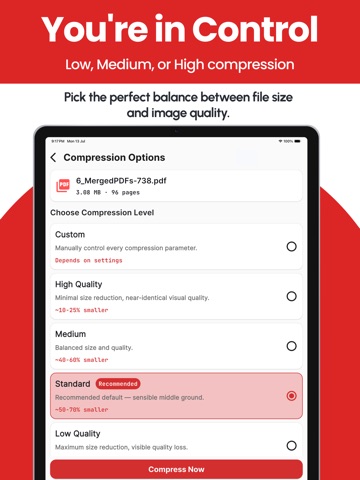
- High Quality — light compression, virtually no visible quality loss
- Medium — balanced size reduction
- Standard (Recommended) — a smart default so you don't have to think about it
- Low Quality — maximum size reduction when you need the smallest file possible
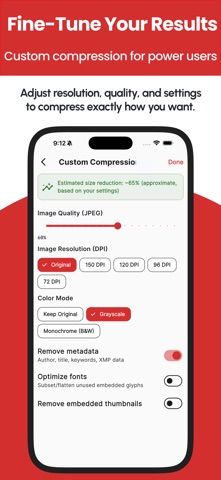
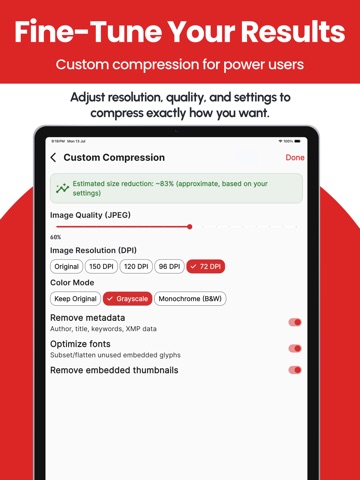
- Custom — full manual control over JPEG quality, image resolution/DPI, color
mode (grayscale or black & white), metadata removal, thumbnail removal, and
font optimization — with a live estimated size preview as you adjust
Most competing apps give you a single "compress" button and hope for the
best. Compress PDF gives you a real dial when you need one, so you can hit an
exact size target for a strict upload portal instead of guessing.
BATCH COMPRESS MULTIPLE PDFs AT ONCE
Select several files and compress them together in a single batch job. A
dedicated progress screen shows the true status of every file — waiting,
compressing, done, failed, or skipped — instead of one vague spinner. When
it's finished, Share All or Export All bundles every result into a single zip
so you're not tapping through separate share sheets one file at a time.
HANDLES PASSWORD-PROTECTED PDFs
Locked PDF? The app detects it and asks for the password instead of silently
failing partway through.
A COMPLETE PDF WORKFLOW, NOT JUST A COMPRESSOR
- Built-in viewer to previ