ClipStamp

ClipStamp Summary
ClipStamp is a free, with in-app purchases iOS app in Photo And Video by Sylvain Lafrance. Released in Jul 2026 (3 months ago). Store last updated Jul 28, 2026
ClipStamp SDKs Summary
App not yet scanned for SDKs.
0★
Ratings: 0
Screenshots



App Description
Drop animated text stickers on any video or photo. Customize fonts, colors, animations, and timing — then export as video or GIF with everything burned in.
Every editing feature is free. No subscription, no account, no ads.
PLACE STICKERS WITH PRECISION
Pause the video and place stickers exactly where you want them. Drag to position, pinch to resize the font, rotate with two fingers. Snap guides and 45-degree rotation snapping keep everything aligned. Double-tap any sticker to fine-tune its style and animation, then tap Preview to watch it play.
CUSTOMIZE EVERYTHING
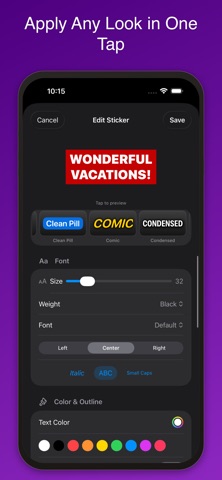
- 7 font designs: Rounded, Default, Serif, Mono, Condensed, Handwritten, Copperplate
- Font size from 5 to 180, adjustable weight, italic, uppercase, small caps
- Text alignment, outline, shadow, and glow with custom colors
- 5 sticker backgrounds: Pill, Rectangle, Rounded, Speech Bubble, Outline
- Text opacity control for watermarks and translucent overlays
- 38 style presets shown as live preview cards — apply any look in one tap
- Emoji stickers from the built-in picker
12 ANIMATIONS
Bounce, Smooth, Slide, Pop, Shake, Spin, Typewriter, Drop In, Elastic, Snappy, Glitch, or None. Adjustable speed from 0.25x to 3x. Repeat Forever to loop for the entire video.
COMBINE CLIPS
- Insert photos and videos at the beginning, current position, or end
- 11 transitions: Crossfade, Slide, Zoom, Spin, Fade to Black, Cover, and more
- Manage Clips: see the original video and every insert in timeline order, reorder or delete with a drag
- Sticker timestamps shift automatically when you insert content
VIDEO TOOLS
- 25 screen effects with live preview: Black & White, VHS, Super 8, Thermal, Pixelate, Halftone, Duotone, Night Vision, Pop Art, Neon Edges, and more
- Video speed from 0.25x to 4x — slow motion or timelapse, stickers stay on their frames
- Trim with drag handles, rotate 90 degrees at a time, mute audio
- Import photos and convert them to videos (3–60 seconds)
SMART EDITING
- Sticker list: see all stickers sorted by time, tap to seek, edit, or delete
- Lock stickers to prevent accidental changes
- Sticker timing editor: adjust exactly when each sticker appears
- Undo and redo everything — stickers, inserts, effects, and speed changes
- Copy and paste stickers, favorite your most-used reactions
PROJECTS
Save your work as a project file and resume editing anytime. All stickers, in