Email Cleaner: Clean Up Inbox

Email Cleaner: Clean Up Inbox Summary
Email Cleaner: Clean Up Inbox is a free, ad-supported, with in-app purchases iOS app in Productivity by FlashSoft OU. Released in Aug 2026 (3 months ago). It has 1.00 ratings with a 5.00★ (excellent) average. Based on AppGoblin estimates, it reaches roughly 8.00 monthly active users and generates around $<10K monthly revenue (27% IAP / 73% ads). Store last updated Oct 5, 2026
Email Cleaner: Clean Up Inbox SDKs Summary
App not yet scanned for SDKs.
5★
Ratings: 1.00
Screenshots


App Description
Clear thousands of old emails in minutes. Swipe left to delete, right to keep, and unsubscribe from the newsletters you never read.
Works with Gmail, Outlook, Hotmail, iCloud, Yahoo and any IMAP mailbox. Your emails stay between your phone and your mail provider.
Your inbox has 12,000 unread messages. Store promos, old receipts, a newsletter you signed up for years ago. Deleting them one by one takes forever, and the mail app was never built for that.
SWIPE THROUGH YOUR MAIL
• Every email becomes a card: swipe left to delete, swipe right to keep
• Mail is grouped by year and month, so you can start with the oldest pile
• Filter by unread, read or all, and switch between Promotions, Social, Updates and Starred
• Changed your mind? Undo the last swipe
CLEAN IN BULK
• Swipe one store and the app catches the same sender across its domains, like every *.aliexpress.com address
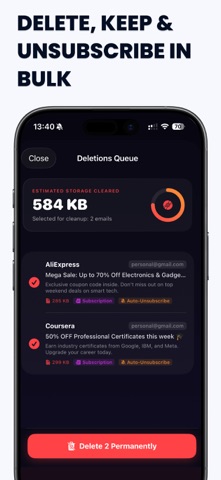
• Queue a whole month for deletion, or keep it all, in one tap
• See how much storage you are about to free before you confirm
UNSUBSCRIBE FROM NEWSLETTERS
• When you delete mailing lists, pick the senders you want to leave
• The app uses the unsubscribe link the sender provides, so new mail stops coming
NOTHING DISAPPEARS BY ACCIDENT
• Swiped emails wait in a review queue, nothing is deleted until you confirm
• Deleted emails go to your Trash folder, most providers keep them for 30 days
• A step by step guide inside the app shows how to restore them
PRIVATE BY DESIGN
• The app connects straight to your mail provider with Google or Microsoft sign-in, or an app password
• Passwords are stored in the Keychain on your device
• We don't keep copies of your emails on any server
EXTRAS
• Home screen widget with your unread and read counts
• Optional reminders every few days to keep the inbox tidy
• Dark mode and 9 languages
WHO IT HELPS
• Anyone looking at a five-digit unread counter
• People subscribed to every store, airline and app newsletter
• Gmail users who want their Google storage back
• Freelancers and small teams with several mailboxes
• Anyone who wants to reach inbox zero and stay there
INBOX REPORT
• Connect a mailbox and see who fills it: top senders, newsletters, heavy emails
• Clean up a whole sender in one tap, or pick the largest emails to free space
• Auto-clean rules queue old mail from chosen senders every time you o
Data also available via the AppGoblin MCP and API (/api/v1/apps/{store_id}).