Runhech Ignite

Runhech Ignite Summary
Runhech Ignite is a free iOS app in Entertainment by MABEL FINCH. Released in Jul 2026 (3 months ago). Store last updated Jul 17, 2026
Runhech Ignite SDKs Summary
App not yet scanned for SDKs.
0★
Ratings:
Screenshots

App Description
Unhech Ignite is your personal candle studio companion. Design custom blends on the Bench, explore the studio's inventory of oils and wicks, and book your pour slot—all from your phone. This is the app for candle makers who want precision and control without the friction of paper notes and studio clutter.
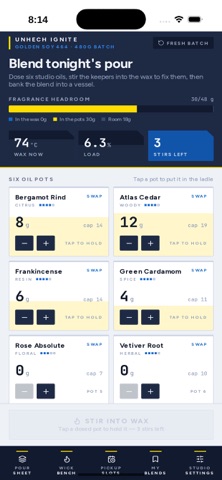
Start on the Bench, where you load your wax into a vessel and see your headroom instantly. The app displays your load percentage, ceiling constraints, and pot cap options, keeping your design within the studio's limits. If you need to swap vessels mid-build, Pot Swap lets you change course without losing your work. Return anytime to refine or start fresh.
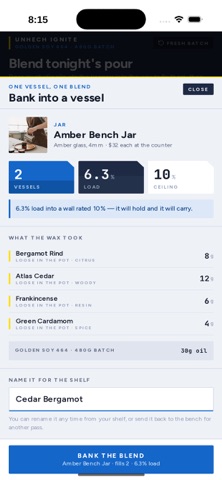
Select your Wax Base and explore Wax Detail to understand your material. You'll see performance characteristics, limits, and working range. Then choose your Vessel from Vessel Detail—it shows load capacity, fit against your wax, and burn behavior for your configuration. Both screens ensure your base and vessel work together. When satisfied, Bank the blend into your vessel.
Choose your Wick from the Wick Bench. The Wick Index shows how different wick sizes perform across the studio's full inventory. Wick Detail lets you verify your choice against your vessel and wax combination, confirming your burn fit. The app ensures your wick works before you pour.
Build your scent on the Oil Shelf. Browse oils by name and flash point, then visit Oil Detail to understand what you're dosing. The app calculates maximum safe doses based on your configuration and tracks every stir, batch element, pool, and cure window. You can reproduce your blend precisely or iterate with confidence. Set a different oil anytime to explore variations.
Explore House Blends to see studio offerings, then build under My Blends. Your blend history—studio creations and custom designs—lives here, organized and ready to pour or refine. Rename Blend updates your naming as work evolves. Blend Detail shows your full formula, oil by oil, before you commit to a session.
When ready to pour, navigate to Pickup Slots and Book the Pour. The app displays available pour days, window labels, and seat counts so you claim your slot immediately. Your Pour Ticket generates a claim code. The Pour Sheet and Pour Ledger record every pour you've booked and completed, so your schedule and history stay at hand.
Log your finished candle on the Burn Card. R