gaku - Photo Frames

gaku - Photo Frames Summary
gaku - Photo Frames is a free, with in-app purchases iOS app in Photo And Video by MAMORU TAKANAMI. Released in Jul 2026 (3 months ago). Store last updated Sep 11, 2026
gaku - Photo Frames SDKs Summary
App not yet scanned for SDKs.
0★
Ratings: 0
Screenshots


App Description
Frame your photos. Like art.
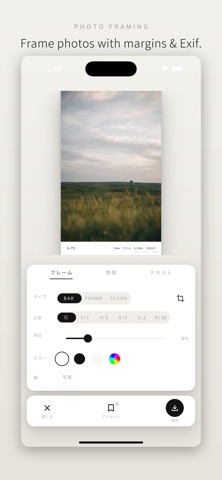
gaku frames your photos with clean margins and shooting info (Exif).
Full quality, no ads.
◆ Framing
- Layouts: BAR / FRAME / POLAROID / FILM / CLEAN
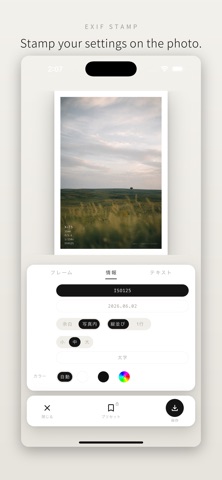
- Show camera info in the margin, or stamp it directly on the photo
- Toggle camera model, focal length, aperture, shutter, ISO, and date with one tap
- Adjust margin size, ratio (1:1 / 4:5 / 4:3 / 3:2 / 9:16), and colors
- Two keyline borders: around the photo and along the outer edge
- Text size, bold, and text color
◆ Quality & metadata
- Exports at full resolution, no quality loss
- Original Exif is preserved in exported JPEGs
- GPS is removed from exports by default — share safely
◆ Videos too
- Apply the same frames to videos and export (Premium)
◆ Shot-location map
- The places you frame are recorded on your own minimal white map (viewing requires Premium)
- Map data never leaves your device
◆ Premium
No watermark / video export / shot-location map / custom text / credit signature / all layouts / presets / batch processing / color extraction
Monthly and yearly plans (both with a 7-day free trial), or a one-time lifetime purchase.
◆ About gaku
- No ads
- All processing happens on your device — nothing is uploaded
- No account required
Terms of Use: https://gaku.mamonis.studio/terms_of_use.html
Privacy Policy: https://gaku.mamonis.studio/privacy_policy.html