PDF Scanner: Size Limit

PDF Scanner: Size Limit Summary
PDF Scanner: Size Limit is a free, ad-supported iOS app in Productivity by Rami Aayadah. Released in Sep 2026 (1 month ago). Store last updated Sep 7, 2026
PDF Scanner: Size Limit SDKs Summary
App not yet scanned for SDKs.
0★
Ratings: 0
Screenshots




App Description
Create a PDF for the upload limit—not a large scan you have to fix later.
PDF Scanner: Size Limit lets you choose the maximum file size before scanning. Select 1 MB, 2 MB, 5 MB, or a custom KB or MB limit, then scan every page. The app adjusts image quality and compression to create the clearest practical PDF within your selected limit.
BUILT FOR STRICT UPLOAD LIMITS
Use it when a website or portal rejects your document because the PDF is too large:
• Online forms and government portals
• University and school applications
• Job applications and supporting documents
• Email attachments
• Any upload that requires a smaller PDF
CHOOSE THE LIMIT FIRST
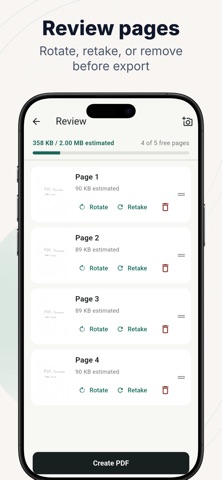
Start with the file size the destination accepts. Watch the estimated PDF size while you scan, so you can make informed choices before the document is finished.
SCAN MULTIPLE PAGES
Automatic edge detection helps find the document. Perspective correction, cropping, rotation, and document enhancement improve each page. Before creating the PDF, you can reorder pages, delete a page, retake it, or rotate it.
ADAPTIVE PDF COMPRESSION
The app adjusts each page to balance readability and file size. When processing is complete, it validates the actual PDF size and shows the result clearly.
PRIVATE DOCUMENT PROCESSING
Your scanned pages are processed on your device and are not uploaded to our servers for document processing. No account is required.
IMPORTANT
The final size depends on the number of pages, document detail, image content, and the selected limit. Very small limits may reduce image quality, and some documents may not reach the requested size while remaining readable. The app reports the actual final size so you know whether the PDF is ready to upload.
Choose the limit. Scan. Upload.