ClipPro: Video & Photo Editor

ClipPro: Video & Photo Editor Summary
ClipPro: Video & Photo Editor is a mobile iOS app in Photo And Video by Ram Tulugu. Released in Sep 2026 (recently released ago). It has 2.00 ratings with a 3.00★ (mixed) average. Based on AppGoblin estimates, it reaches roughly 37 monthly active users . Store last updated Sep 8, 2026
Recent activity: 1.00 new ratings this week View trends →
ClipPro: Video & Photo Editor SDKs Summary
App not yet scanned for SDKs.
3★
Ratings: 2.00
Screenshots



App Description
A complete video, photo and collage editor that never leaves your device.
Cut on a real timeline, grade with sixteen cinematic looks, add titles, stickers
and music, brand it with your own watermark, and export up to 4K. No account, no
ads, no subscription, and no internet connection required — ever.
WHAT YOU SEE IS WHAT YOU EXPORT
ClipPro previews and renders through one engine, so the grade, crop, title or
transition you see while editing is exactly what lands in the finished file. No
surprises after a long render.
A REAL TIMELINE
• Multi-clip editing with frame thumbnails
• Split, merge, trim, duplicate and reorder
• Speed from 0.1x to 16x, with audio kept in sync
• Freeze frame from any point
• Interactive crop with aspect lock, rotate and flip
• Fifteen transitions: fade, dissolve, slides, wipes, iris, zoom, whip pan,
flash and blur
• Undo and redo, plus autosave — there is no Save button to forget
SIXTEEN CINEMATIC GRADES
B&W, Warm, Cool, Vivid, Fade, Vintage, Cinema, HDR, Film, Retro, Vlog, Neon,
Aesthetic, Portrait and Landscape — each with its own strength dial, and each
previewed on your own footage rather than a stock thumbnail.
TITLES, STICKERS AND DRAWING
• Seven typefaces, colour, outline, shadow, spacing and opacity
• Four caption background styles
• Eleven in and out animations, including typewriter
• Eighteen ready-made title presets
• Around 450 emoji stickers across eight groups
• Freehand drawing with pen, highlighter, arrow, line, rectangle and oval
• Drag anything on the preview; time it on its own timeline lane
SOUND
• Add music from your files
• Extract a clip's own audio onto its own lane
• Record a voiceover against the picture
• Generate narration with on-device text to speech
• Built-in sound effects, synthesised rather than sampled
• Volume, fade in, fade out and a real noise reducer
• Waveforms drawn on the timeline so you can cut to the beat
YOUR BRAND, EVERY VIDEO
Save a template once — canvas shape, watermark, intro card and end card — and
apply it in a tap. Cards arrive as real, editable clips, and every piece is
addressable: tap the subscribe button to edit the button, tap the bell to edit
the bell. Five creator presets included.
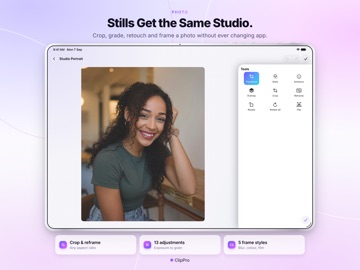
PHOTO EDITOR
The same crop, grades, text, stickers and drawing, exported as an image in JPEG,
PNG or HEIC.
COLLAGE
Up to nine photos i