Morphiqo: AI Face Swap Video

Morphiqo: AI Face Swap Video Summary
Morphiqo: AI Face Swap Video is a free, with in-app purchases iOS app in Photo And Video by Lisen Huang. Released in Aug 2026 (1 month ago). It has 2.00 ratings with a 4.75★ (excellent) average. Based on AppGoblin estimates, it reaches roughly 35 monthly active users and generates around $<10K monthly revenue (100% IAP / 0% ads). Store last updated Sep 16, 2026
Recent activity: 1.00 new ratings this week View trends →
Morphiqo: AI Face Swap Video SDKs Summary
App not yet scanned for SDKs.
4.75★
Ratings: 2.00
Screenshots


App Description
Morphiqo swaps faces in videos and photos entirely on your own device. Nothing is uploaded, nothing waits in a queue, and no account is required.
See how the swap looks on your own device, then decide.
WHAT MORPHIQO DOES
Put a face into a video or a photo while keeping the original movement, lighting and expression. In a group shot, replace every face at once, a single face, or choose exactly which face to change.
- Video face swap, processed locally
- Photo face swap with the same engine
- Every / One / Choose face selection for multi-person shots
- Works with no network connection at all
WHY ON-DEVICE MATTERS
Most face swap services upload your photos and videos to their servers and process them on shared hardware. Your face leaves your device, sits in someone else's storage, and waits behind other people's jobs.
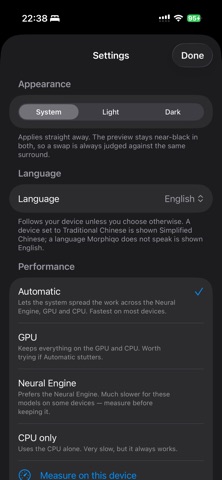
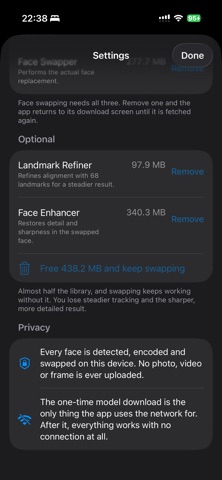
Morphiqo never does this. The model runs on your device's GPU and Neural Engine. Your media stays in your photo library. There is no server to breach, no account to leak, and no upload to sit through. A one-minute 4K clip can take several minutes just to upload on a typical connection. Morphiqo starts working straight away.
HOW IT WORKS
1. Pick a source face from your photos
2. Pick the video or photo you want to change
3. Choose which face or faces to replace
4. Preview the result on your device
5. Subscribe to export in full quality
ABOUT PROCESSING TIME
Because everything runs on your own hardware, processing takes time, and how long depends on which device you use. As a guide, allow roughly three times the length of the clip on a recent device, so a ten-second clip takes about thirty seconds. Footage recorded at 60 frames per second takes about twice as long. Older devices are slower.
Morphiqo shows an estimate before every job, so you always know what you are waiting for. For video we recommend a device released in the last few years; you can check compatibility in the Information section of this page.
MORPHIQO PRO
- Export your face swaps in full quality
- Unlimited exports, with no credits, coins or per-video charges
- All face selection modes, including multi-person shots
- Every future model improvement
PRIVACY
Your photos, videos and faces are processed on your device and are never sent to us or to any third-party AI service. We do not collect them, we do not store them, and we do not build a face database