Origami 3D: Learn to Fold

Origami 3D: Learn to Fold Summary
Origami 3D: Learn to Fold is a free, with in-app purchases iOS app in Education by Binaryscript Private Limited. Released in Aug 2026 (2 months ago). Store last updated Sep 25, 2026
Origami 3D: Learn to Fold SDKs Summary
App not yet scanned for SDKs.
0★
Ratings: 0
Screenshots


App Description
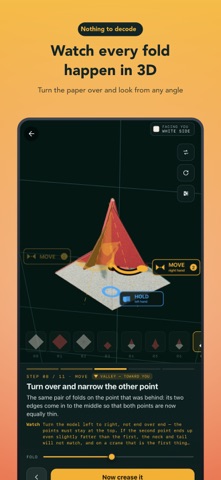
Paper diagrams ask you to work out what a dotted line means and which layer is supposed to move. Origami 3D shows you — on a real sheet you can turn around, watch again, and take apart.
WHAT YOU GET
A viewer that actually shows the fold
- Rotate and zoom the paper — see the fold from any angle
- Scrub through a single fold and watch the paper bend at your own pace
- Split the layers apart to see what is sitting on top of what
- Markers show which hand holds and which hand moves, and in what order
- Left-handed mode, and paper colours you can match to the sheet in front of you
A course, not a pile of models
- 7 modules and 62 lessons, each teaching one idea
- Every lesson uses the fold you learned in the last one
- 2 to 12 minutes each, ending with something you can keep
A library of 63
- 55 finished models, 6 bases and 2 techniques, searchable
- All traditional origami — folds passed along for generations
Works completely offline
- The 3D engine and every model are built into the app
- No downloads, nothing to load — fold on a plane or with no signal at all
Honest about its limits
- The engine folds one straight crease at a time, which is what makes it clear
- Two models need a move it cannot show, and say so rather than faking it
MADE FOR
Complete beginners, anyone who got stuck on the diagrams in an origami book, parents and children folding together, and anyone who wants to fold a crane.
FREE HOUR, THEN YOURS
Try the whole course free for an hour, once — no account and no card.
After that, unlock it quarterly, yearly, or with a one-off purchase that never expires.
Square paper is all you need — and if you only have A4, the first lesson gets a square out of it. Install it and fold your first model in the next five minutes.
LEGAL
Terms of Use: https://web.binaryscript.com/origami-3d/terms
Privacy Policy: https://web.binaryscript.com/origami-3d/privacy-policy/
On iPhone and iPad the course is a single one-off purchase, charged to your Apple Account at confirmation. It does not renew and cannot lapse. Restore purchase in Settings brings it back on a new device.