Zimma: KYC & Document Vault

Zimma: KYC & Document Vault Summary
Zimma: KYC & Document Vault is a free iOS app in Productivity by Manish Gupta. Released in Sep 2026 (recently released ago). Store last updated Oct 5, 2026
Zimma: KYC & Document Vault SDKs Summary
App not yet scanned for SDKs.
0★
Ratings: 0
Screenshots

App Description
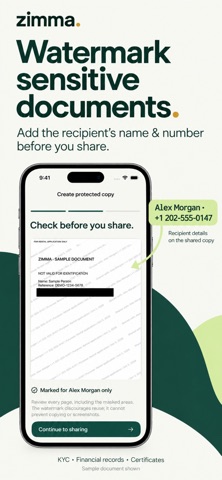
Watermark sensitive documents with the recipient’s name, phone number and purpose before you share. Zimma helps you mask private details and send a separate PDF or image copy while keeping your original in an encrypted vault on your iPhone.
FOR MORE THAN KYC
Prepare copies of identity documents, financial records, certificates, address proofs and other sensitive paperwork for rentals, job applications, travel or verification requests.
1. IMPORT YOUR DOCUMENT
Choose a PDF or image from Files or Photos, or scan paper documents with your camera. Select only the pages needed for the request.
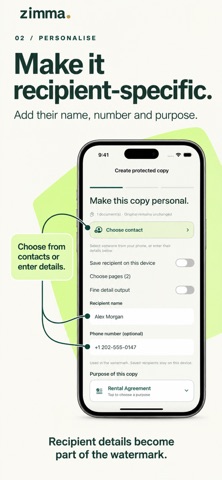
2. ADD THE RECIPIENT AND PURPOSE
Choose a contact from your phone or enter their details. Add their name, phone number and the reason for sharing. Zimma places these details in a visible watermark on the copy, making the intended recipient and use clear.
3. HIDE UNNECESSARY PRIVATE DETAILS
Draw masks over information the recipient does not need. Covered pixels are removed from the exported copy. Your original stays unchanged.
4. REVIEW, THEN SHARE
Adjust the watermark text size with the preview slider. Check every page, including the watermarks and masks. Save one PDF or separate PNG images, or send the prepared copy through the iPhone share sheet.
YOUR ORIGINALS STAY PRIVATE
• Encrypted local document vault
• Optional Face ID, Touch ID or device passcode app lock
• Categories, search and favourites
• Reusable document packs
• No account, advertising, in-app analytics or automatic uploads
KNOW THE LIMITS
A recipient watermark makes the intended use visible and can discourage casual reuse. It cannot prevent copying, editing, screenshots or misuse. Shared copies cannot be revoked or tracked and are not password-protected. Check the receiving organisation’s requirements before sending a watermarked or redacted document. Keep backup originals somewhere safe: deleting Zimma or losing your device can remove your local vault.