CheckForge

CheckForge Summary
CheckForge is a free iOS app in Productivity by xiaopeng ji. Released in Aug 2026 (2 months ago). Store last updated Sep 5, 2026
CheckForge SDKs Summary
App not yet scanned for SDKs.
0★
Ratings: 0
Screenshots



App Description
Checkforge turns plans into practical, organized checklists. Create tasks yourself, start from a reusable template, or ask AI to build a complete checklist with helpful notes in seconds.
Whether you are preparing for a trip, organizing fieldwork, managing a project, completing routine inspections, or coordinating everyday responsibilities, Checkforge keeps the details clear and easy to follow.
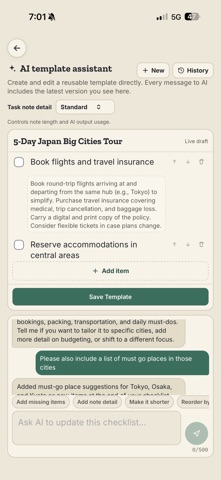
CREATE CHECKLISTS WITH AI
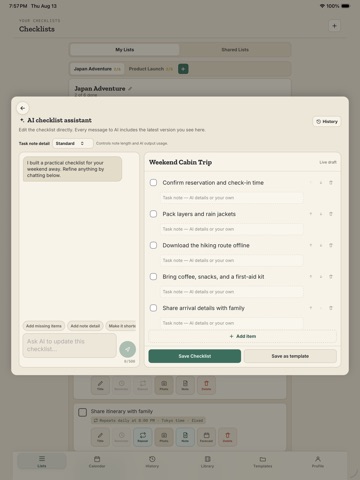
Describe what you need to accomplish and let AI create a structured checklist for you. Continue the conversation to add, remove, reorder, or improve tasks.
AI can also generate useful notes for each task. Choose how much detail you want—from no notes to detailed guidance—then review and edit everything before saving.
COLLABORATE ON SHARED LISTS
Share a checklist with other people and work from the same up-to-date list.
• See who shares each checklist
• Assign responsibility for individual tasks
• Follow task completion as the list changes
• See who completed shared tasks
• Join or leave shared checklists easily
• Review shared activity and task history
Shared checklists refresh automatically, helping everyone stay aligned when members join, leave, or update tasks.
FLEXIBLE REMINDERS
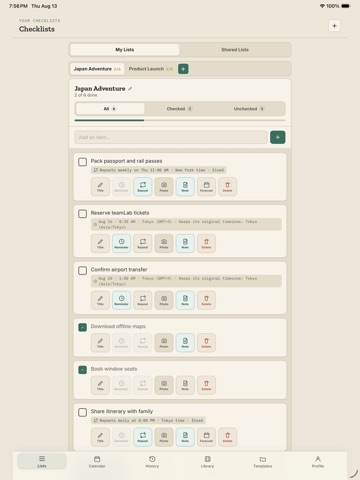
Add a one-time reminder for a specific date and time, or create a recurring schedule for work that repeats.
Recurring reminders can support:
• Daily schedules
• Selected days of the week
• Selected days of the month
• Multiple schedule patterns
• Custom dates and times
• Time-zone-aware scheduling
View upcoming work from the calendar and quickly understand what needs attention next.
ADD NOTES AND PHOTOS
A task can hold more than a short title. Add formatted plain-text notes for instructions, addresses, reference information, numbered steps, or other important details.
Attach photos when visual context is useful. Photos are especially helpful for inspections, records, equipment, locations, completed work, or anything that is easier to understand by seeing it.
REUSE YOUR BEST WORK
Turn an existing checklist into a personal template and use it again whenever needed. You can also build templates manually or generate them with AI.
Templates help you standardize recurring processes without rebuilding the same list each time.
STAY ORGANIZED
• Filter tasks by All, Checked, or Unchecked
• Review completed checklists
• Reactivate previou