iperf3 - Network Tools

iperf3 - Network Tools Summary
iperf3 - Network Tools is a mobile iOS app in Developer Tools by RanduSoft SRL. Released in Aug 2026 (2 months ago). Store last updated Aug 17, 2026
iperf3 - Network Tools SDKs Summary
App not yet scanned for SDKs.
0★
Ratings: 0
Screenshots



App Description
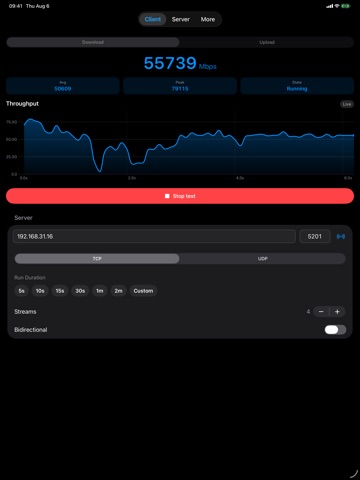
iperf3 Mobile is a professional LAN throughput tool for home labs and power users. It embeds open-source iperf3 so you can run real, wire-compatible client and server tests across your local network, not a consumer internet speed test.
ONE APP, CLIENT AND SERVER
• Run as a client against any stock iperf3 server (Mac, Linux, NAS, or another device)
• Run as a foreground server so phones, tablets, Macs, or Apple TV can be the other end of the path
• One active test at a time, matching classic iperf3 behavior
TEST THE WAY YOU ALREADY DO
• TCP and UDP
• Upload, download (reverse), multi-stream, and bidirectional
• Live throughput chart plus UDP loss and jitter where applicable
• Duration presets, stream count, and UDP target bitrate
• Default port 5201, the same default as stock iperf3
FIND OTHER DEVICES
• Bonjour discovery for other iperf3 Mobile servers on your LAN
• Always enter a hostname or IP for stock iperf3 (-s) peers
SHORTCUTS AND AUTOMATION
• Run client tests from the Shortcuts app with host, port, duration, streams, protocol, and more
• Start or stop the in-app server from Shortcuts (server keeps the app foreground while listening)
• Structured results return throughput for multi-step automations and Siri
BUILT FOR APPLE PLATFORMS
• Universal purchase for iPhone, iPad, Mac, and Apple TV
• tvOS UI sized for the living-room endpoint
• Mac as a convenient always-reachable lab peer while the app is open
PROPER TOOLING
• Embeds upstream iperf3 (esnet/iperf); open-source license included in the app
• Local Network access is used only for tests and peer discovery
Need a quick start? Start the server on one device (or run stock iperf3 -s on a Mac/NAS), then point the client at that host and port.