Sundry - Track Anything

Sundry - Track Anything Summary
Sundry - Track Anything is a free iOS app in Health And Fitness by Roman Volkov. Released in Sep 2026 (2 months ago). Store last updated Sep 2, 2026
Sundry - Track Anything SDKs Summary
App not yet scanned for SDKs.
0★
Ratings:
Screenshots


App Description
Sundry is the calm, private home for every number you keep.
Weight, blood pressure, blood sugar, sleep, water, mood, heart rate, steps — or anything you can put a number on. Write it down in seconds and see the chart, the trend, and the stats right away. It has the speed of a notes app and the tidiness of a spreadsheet, without any of the setup.
Made for anyone who already keeps a little list of numbers somewhere — on paper, in Notes, in a weight.xlsx — and just wants one calm place built for the job.
WHY SUNDRY
• One home for all your numbers, instead of ten single-purpose apps.
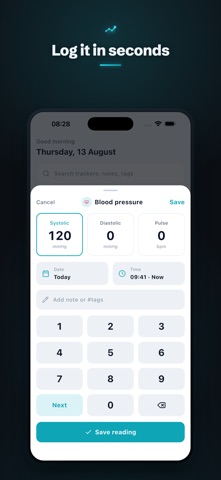
• Fast to jot down — quick-add from the home screen, with your last value pre-filled.
• Clear at a glance — every tracker gets a chart, a trend, and stats, with nothing to configure.
• Private by design — your data stays on your device. No account, and nothing is uploaded to us.
• Yours to keep — a clean, tidy log of your own.
WHAT YOU CAN DO
• Start in one tap with ready-made trackers: weight, BMI, body measurements, blood pressure, heart rate, blood sugar, sleep, water, mood, temperature, medication, and more.
• Or build your own — name it, pick an icon and color, and add exactly the fields you want.
• Track a few things at once in one entry — log systolic, diastolic and pulse together in a single blood-pressure reading.
• Fields for real life: numbers with your own precision, durations, yes/no, 1–5 ratings, and notes.
• Times fill in automatically, and you can always change them — log this morning's reading at lunch, or fill in older days. It never forces "now."
• Smart defaults bring back your last value, so a small change is a single tap.
• A full history for every tracker, grouped by day, week and month; swipe to edit or delete, with undo.
• Clean charts — line and bar, with week / month / 3-month / year / all ranges, a moving-average trend line, and more than one field on the same chart.
• Stats worked out for you: average, min, max, latest, change since last time, totals, and streaks.
• Insights that put two trackers on one chart, so you can see how they move together.
• Reminders that nudge you to log — set a daily, weekday or custom schedule for any tracker.
• Keep it tidy with categories, pin your favorites to the top, and search across names, notes and tags.
• Archive trackers you've finished with, wit