Ombra: Save from any video

Ombra: Save from any video Summary
Ombra: Save from any video is a free, with in-app purchases iOS app in Tools by Sum of Tech Ltd. Released in Aug 2026 (2 months ago). It has 6.00 ratings with a 5.00★ (excellent) average. Based on AppGoblin estimates, it reaches roughly 54 monthly active users and generates around $<10K monthly revenue (100% IAP / 0% ads). Store last updated Oct 26, 2026
Ombra: Save from any video SDKs Summary
App not yet scanned for SDKs.
5★
Ratings: 6.00
Screenshots

App Description
You saved the video. What you actually needed was the recipe.
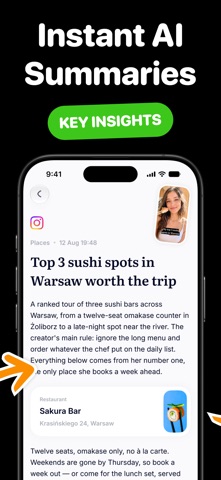
Ombra turns a saved video into something you can use. Share a link and it comes back as a card: a recipe with ingredients and steps, places pinned on a map, a list of products, or notes you can search.
WHAT YOU GET BACK
Recipes — ingredients with amounts, the method broken into steps, timers where the video gives them. Change the servings and the amounts follow.
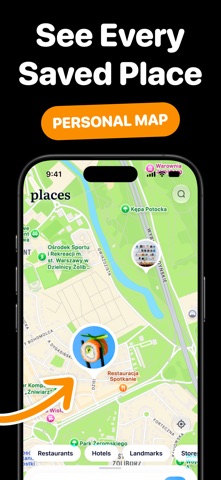
Places — every spot mentioned, on one map. Open directions for any of them, or browse everything you have saved from the Map tab.
Products — what was used and where it came from, with links when they exist.
Lists and how-tos — the gear, the steps, whatever the video counted off, as text you can copy.
YOUR LIBRARY, ON YOUR DEVICE
Everything you extract is stored locally. Search it, sort it into collections, mark favorites. It opens instantly and keeps working with no connection — what you paid to get out of a video is yours, whether or not the network is.
ASK ABOUT ANYTHING YOU SAVED
Every card has a chat. Ask what to use instead of an ingredient, how long something keeps, which of those places is open late. It answers from what the video actually said, not from a guess.
HOW SCANS WORK
One scan turns one video into a note. The library, the map and the chat are free — scans are what you pay for.
A plan gives you scans every period. You can also buy a pack of scans once, at any time, with or without a plan. Pack scans never expire:
10 scans
30 scans
100 scans
250 scans
If a scan fails, it is refunded automatically and you can see it in your history. Send the same link twice and the second one is free.
Save the video if you like. Keep the part you needed.
Subscriptions renew automatically unless canceled at least 24 hours before the end of the current period. Your account is charged for renewal within 24 hours before the current period ends. Payment is charged to your Apple Account. You can manage or cancel your subscription at any time in your Apple Account settings after purchase.
Privacy Policy: https://sumoftech.com/privacy
Terms of Service: https://sumoftech.com/terms