Sales Dialer – CSV Call List

Sales Dialer – CSV Call List Summary
Sales Dialer – CSV Call List is a free iOS app in Business by Seiya.k. Released in Aug 2026 (1 month ago). It has 1.00 ratings with a 1.00★ (poor) average. Based on AppGoblin estimates, it reaches roughly 24 monthly active users . Store last updated Sep 18, 2026
Sales Dialer – CSV Call List SDKs Summary
App not yet scanned for SDKs.
1★
Ratings: 1.00
Screenshots

App Description
Import a CSV. Call through the list. Export every result.
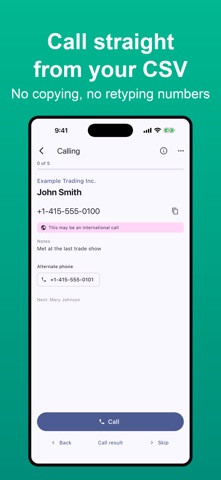
If your prospects live in a spreadsheet, this app lets you call them without copying numbers or typing them in. After each call you pick the outcome, and it is recorded — then export everything back in the CSV format your company expects.
■ What it removes from your day
・Hunting for the next number in a spreadsheet
・Copying or retyping phone numbers
・Going back to the sheet to write down what happened
・Working out which rows you already called
■ It reads the CSV you already have
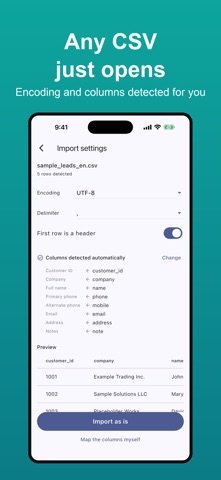
Formats differ from company to company, and that is fine. The app detects the encoding (UTF-8 / Shift_JIS) and the delimiter (comma / tab / semicolon), and you can change either. It also guesses which column is which from names like "phone", "mobile" or "company", so most files import with nothing to adjust.
Leading zeros survive. So do commas and line breaks inside quoted fields.
■ Your original file comes back intact
Every column, in the original order, with the original values. Call results are appended as new columns at the end. Your source file is never modified. Before exporting you can check the file name, row count, encoding and the first five rows.
You can also map statuses to the values your company uses — set "Appointment → 01" once and the export is ready to hand over.
■ Layer a newer CSV on top
Import a new CSV into an existing list and apply only the differences. Rows are matched by customer ID or phone number, and you see how many will be added, updated or left unchanged before anything is written. Call results, notes and callback times are never overwritten, and blank cells will not erase existing values.
■ Never call the same number twice
Before importing you see numbers repeated within the file, numbers already present in another list, and numbers on your do-not-call list. Each list has a duplicate check where you keep one lead per number and exclude the rest. Excluded rows still appear in the exported CSV.
■ Set it up once, reuse it
Save a column mapping as a template. The next time you import a file with the same columns, the app offers it automatically, and if columns were added or removed it shows you the difference first. Templates export as files, so you can move them to another device or share them.
■ How calling works
Tap the large call button and the Phone app op