Detail Day

Detail Day Summary
Detail Day is a free iOS app in Business by TAO CHEN. Released in Sep 2026 (recently released ago). Store last updated Sep 16, 2026
Detail Day SDKs Summary
App not yet scanned for SDKs.
0★
Ratings:
Screenshots


App Description
The car looks incredible and you're standing in a driveway with wet hands, trying to remember what you quoted three days ago. The before shot is buried in a camera roll with four hundred other photos. The invoice is something you'll write tonight, probably. The software built for this assumes you're a shop with bays and staff and a front desk. You're one person and a van.
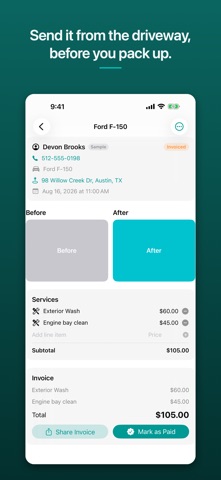
Detail Day is one job on one screen. Book it, shoot the before, shoot the after, generate the invoice, send it, mark it paid — top to bottom on a single card, in the order you actually do the work. There's no tab bar, because there is nowhere else to go.
THE LOOP
1. Book a job in about thirty seconds: customer name and phone, make and model, a service chip — Full Detail, Interior Only, Exterior Wash, Custom — with a starting price you can override, a date and time, and an address.
2. Arrive, open the job, tap Before. The camera opens.
3. Do the detail.
4. Tap After. The two shots snap into a side-by-side pair. That's the proof of the job, and it sits at the top of the card where the customer can see it.
5. Generate Invoice. The line items carry over from the booking, and you can add what you sold on site — pet hair removal, engine bay, headlight restoration — while you're standing there.
6. Share the invoice through Messages, Mail, WhatsApp, AirDrop, whatever you already use with that customer. Then Mark as Paid.
WHAT'S IN IT
- A flat agenda: Today, Upcoming, Earlier. No calendar grid to navigate.
- A status on every job — Booked, Photographed, Invoiced, Paid — that moves as you work and shows on the list the moment you back out.
- Tap a customer's number to call them. Tap the address to open it in Maps.
- Before and after photos captured with the real camera, stored against the job rather than loose in your camera roll.
- Generate Invoice stays dimmed until both photos exist, so an invoice never goes out without the proof behind it.
- Line items you can add and remove on the job card, with a running subtotal.
- Mistakes aren't permanent: edit a job's customer, vehicle, time or address after saving, and delete a single job — or a customer and everything theirs — behind a confirmation that tells you exactly what goes.
- Everything is stored on your iPhone, in the app's own storage. Close the app, restart the phone, your jobs and photos are there.
- No account to create