Shotlist — Wedding Shot List

Shotlist — Wedding Shot List Summary
Shotlist — Wedding Shot List is a free iOS app in Photo And Video by TAO CHEN. Released in Aug 2026 (1 month ago). Store last updated Aug 29, 2026
Shotlist — Wedding Shot List SDKs Summary
App not yet scanned for SDKs.
0★
Ratings:
Screenshots


App Description
You're forty minutes into the reception before it lands: nobody got the cake. Or the grandparents. Or her shoes on the windowsill, which was the one thing she asked for.
Every photographer has a list. It lives on a folded page in a camera bag, in a notes app that was never built for this, or in your head — which is the worst place for it when you're eight hours in and running on adrenaline.
Shotlist is that list, built for the way the day actually goes.
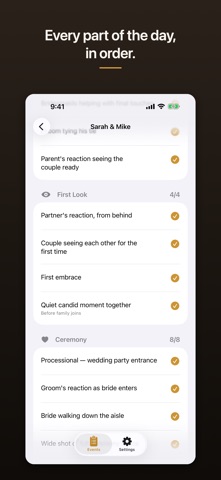
Open an event and your shots are grouped the way the day runs: Getting Ready, First Look, Ceremony, Family Formals, Wedding Party, Reception, Details. Tap a row the moment you take the shot. One tap, no confirmation, no menus, one hand — the other one is holding a camera. A progress ring at the top tells you where you stand without reading a word, and every section carries its own count, so in the gap between the ceremony and the formals you can glance at "Ceremony 8/8", know you're clear, and move.
It works in a stone church basement with no bars. There is no network anywhere in this app.
WHAT'S IN IT
Four built-in templates: Wedding — Full Day (48 shots across 7 sections), Engagement Session (16 shots), Portrait Session (11 shots), Corporate Event (14 shots).
Lists written by someone who has shot a wedding. "Rings on a flat surface — both bands plus the engagement ring." "Groom's reaction as bride enters." "Quiet candid moment together, before family joins."
One-tap check-off with a haptic pulse and a checkmark that draws in. Tap again to uncheck. Nothing asks you to confirm, because during a first dance a confirmation dialog is the enemy.
A progress ring showing captured out of total, plus a captured/total count on every section header.
A new event in under thirty seconds: name, date, pick a template. The template is copied into the event, so the list you're working belongs to that event and nothing can reshape it out from under you later.
Saved to your iPhone the instant you tap. Check-offs survive the app being backgrounded, force-quit, or killed by iOS in the middle of a reception.
Fully offline. Nothing to sign up for, no password, no email, no verification code. No permissions requested — no camera, no photo library, no location, no notifications, no contacts.
Full dark mode, which is the mode you will actually be using at a reception.
Sample events, only if you want them. Your