Driver Profit: Net Per Hour

Driver Profit: Net Per Hour Summary
Driver Profit: Net Per Hour is a free iOS app in Finance by TAO CHEN. Released in Sep 2026 (1 month ago). Store last updated Sep 10, 2026
Driver Profit: Net Per Hour SDKs Summary
App not yet scanned for SDKs.
0★
Ratings:
Screenshots

App Description
The app you drive for tells you that you made $24 an hour. It does not subtract the fuel you burned, the tires you wore down, or what another 180 miles did to what your car is worth. The long unpaid run out to a pickup costs you real money, and that number never shows it.
Driver Profit takes the gross you were paid, subtracts what those miles cost you, and gives you one number: net profit per hour.
You decide what a mile costs. Fuel, maintenance and depreciation are three separate figures you can see and change, and picking your vehicle type fills in a starting point you can edit or replace. That figure is your estimate, not something the app knows about your car — it is shown next to the math every time it is used.
HOW IT WORKS
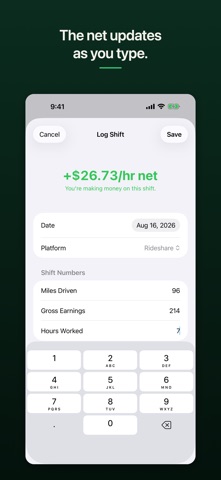
1. Tap Log Shift. Enter miles driven, gross earnings and hours worked. The date defaults to today and the platform tag is optional.
2. The number arrives before you save. Net profit per hour appears the moment all three fields have values and updates on every keystroke — green while the shift is making money, red once the miles have eaten it. This is the whole point of the app: watching a good-looking gross get cut down to what it actually was.
3. Save. The shift joins your history with net per hour as the headline on every row.
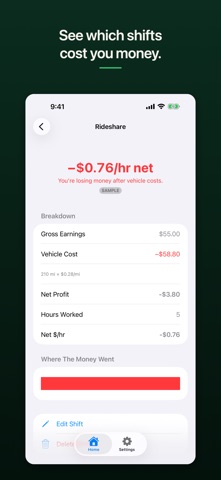
4. Tap a shift for the full breakdown: gross, minus miles times your cost per mile, equals net profit, divided by hours, equals net per hour — with one small bar showing how much of the gross the miles took.
WHAT'S IN IT
- The live number on the Log Shift screen. No Calculate button to press.
- Your own cost per mile, split into fuel, maintenance and depreciation, with four starting presets: sedan, SUV or truck, EV, or custom. Change it whenever fuel prices or your car change.
- Past shifts keep the rate they were logged with. Updating your estimate today does not quietly rewrite last week.
- Edit or delete any shift. Delete asks first.
- Everything stays on your iPhone. No account, no sign-up, no internet connection, no analytics, no ads.
- Export your shifts as a CSV file any time from Settings — a spreadsheet-ready copy of everything you logged.
- The first launch is empty on purpose. Tap Load Sample Data for a week of example shifts — each one badged Sample, removed in one tap from Settings, and never counted in your totals or your export.
- If a save cannot reach storage, the app says so,