Milepost: Mileage Log

Milepost: Mileage Log Summary
Milepost: Mileage Log is a free iOS app in Finance by TAO CHEN. Released in Sep 2026 (recently released ago). Store last updated Sep 16, 2026
Milepost: Mileage Log SDKs Summary
App not yet scanned for SDKs.
0★
Ratings:
Screenshots

App Description
You drove to a client, then to the supply house, then home. Three weeks later
you are staring at a bank statement trying to remember which of those miles
were business, and how far it actually was. Most of us log nothing all year
and then reconstruct the whole thing from memory the week taxes are due —
which is exactly the kind of "log" that falls apart if anyone ever asks to
see it.
Milepost builds the log while you drive. Tap Start Trip when you pull out.
Tap Stop Trip when you arrive. Say whether it was business, and why. That is
the whole habit, and it takes a few seconds per trip.
When your accountant asks, or the filing deadline arrives, tap Export and
pick a date range. Milepost renders a dated, paginated PDF mileage log — one
row per trip with the date, purpose, miles, and business percentage, plus
totals and the IRS standard mileage rate that was applied.
HOW IT WORKS
- Start Trip opens a full-screen recorder: a live mileage counter, elapsed
time, and a sketch of the route as you drive it.
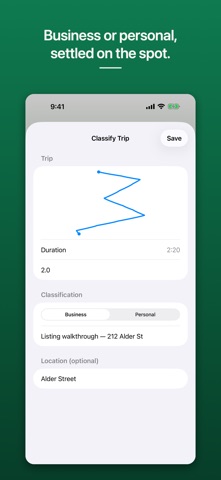
- Stop Trip hands you the number. The mileage field is always editable — the
number you confirm is what gets saved, never a figure the app cannot show
its work for.
- Mark the trip Business or Personal. Business trips ask for a one-line
purpose, because a log without a purpose is not much use later.
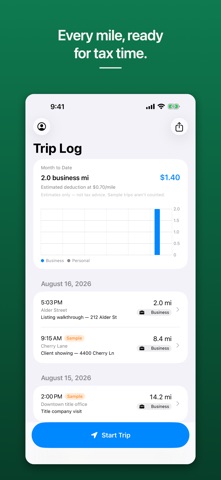
- Save, and the trip sits at the top of your log. Month-to-date business
miles and the estimated deduction update straight away.
- Tap any trip to edit its miles, purpose, or classification, or to delete
it. Swipe a row to reclassify or delete without opening it.
- Export covers This Month, Last Month, Year to Date, or a custom range,
with a Business-trips-only toggle, and hands the PDF to the standard share
sheet — Files, Mail, AirDrop, print, whatever you already use.
WHAT IT DELIBERATELY DOES NOT DO
Milepost does not watch for driving in the background and never guesses that
a trip happened. Location is used only while a trip is actively recording,
and only with When In Use permission, which it asks for the first time you
tap Start Trip.
If you lock the phone or switch apps mid-trip, tracking pauses — the
editable mileage field on the Stop screen is there so you can correct the
total. If you deny location outright, trips still record and you type the
miles in yourself.
That is a deliberate trade. You get an app that never runs in th