Receipt Box: Photo to CSV

Receipt Box: Photo to CSV Summary
Receipt Box: Photo to CSV is a free iOS app in Business by TAO CHEN. Released in Sep 2026 (1 month ago). Store last updated Sep 10, 2026
Receipt Box: Photo to CSV SDKs Summary
App not yet scanned for SDKs.
0★
Ratings:
Screenshots


App Description
A shoebox of receipts. A drawer stuffed with them. A glovebox full of fuel slips. Once a month you sit down and type them into a spreadsheet one at a time, and the ones that faded or went through the wash are simply gone.
Receipt Box is a receipt drawer that lives on your phone. Photograph a receipt while it is still in your hand, fill in the four things that matter, and save it. When your bookkeeper or accountant needs the records, tap Export and send a CSV.
It does one job. It is not an accounting package — no invoices, no mileage, no bank feeds, no monthly close.
HOW IT WORKS
- Tap +, then Take Photo or Choose from Library.
- A review screen opens with the photo alongside four fields: Merchant, Date, Total, Category. Nothing is saved until you confirm it. There is no path from a photo to a saved record that skips this screen.
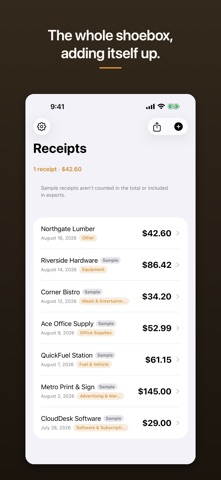
- Save. The receipt joins the list, newest first, and the header updates: "12 receipts · $486.30".
- Tap any receipt to see the photo and the saved details, edit a field you got wrong, or delete it. Swipe to delete from the list.
- Tap Export for a CSV with four columns: Merchant, Date, Total, Category.
WHAT IS IN IT
- The photo is kept with the record. The numbers are the summary; the photo is the evidence a bookkeeper or an auditor will actually ask for.
- Eleven fixed expense categories: Meals & Entertainment, Office Supplies, Travel, Fuel & Vehicle, Utilities, Equipment, Software & Subscriptions, Advertising & Marketing, Rent & Facilities, Professional Services, Other.
- Exported dates are written as yyyy-MM-dd and totals as plain two-decimal numbers with no currency symbol, so Excel, Numbers, and Google Sheets read them as dates and numbers rather than as text — on any device region.
- A merchant name containing a comma is quoted properly in the CSV, so one comma cannot shift a column.
- Amounts accept two decimal places and no more, so the amount you type, the amount the list shows, and the amount the CSV exports are always the same number.
- A first launch is empty — no invented receipts mixed in with yours. If you want to see what a full drawer looks like first, Load Sample Data adds six fictional receipts, each visibly badged "Sample". Sample receipts are never included in an export, and Settings removes them all in one tap without touching anything you entered yourself.
- If a save fails — a full disk, usuall