SOAP Notes for Massage

SOAP Notes for Massage Summary
SOAP Notes for Massage is a free iOS app in Medical by TAO CHEN. Released in Aug 2026 (1 month ago). Store last updated Aug 24, 2026
SOAP Notes for Massage SDKs Summary
App not yet scanned for SDKs.
0★
Ratings:
Screenshots

App Description
You meant to write it up after she left. Then the next client was early, and the one after that ran long, and now it is nine at night and you are trying to remember whether the tightness was the left trap or the right, and what you told her to do about it before the next visit.
SoapNotes is somewhere to write that down in the five minutes you actually have — standing at the table, phone in one hand, before the detail fades.
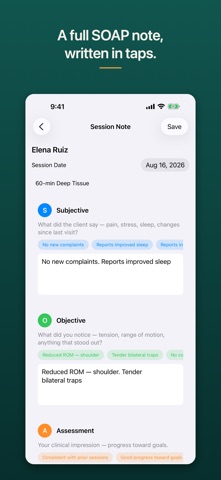
Open the app, tap the client you just saw, tap New Session Note. Four sections in the order you already think in: Subjective, Objective, Assessment, Plan. Each one has a row of tappable phrases for the things you write every week, so most of a note is taps and you type only what was specific to that person. Save, and it is attached to that client's chart for the next time you see them.
Everything stays on this iPhone. There is no account to create, no server, no sync, and the app makes no internet connection of any kind.
HOW IT WORKS
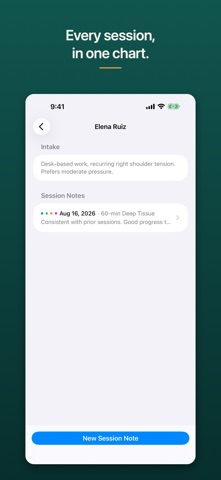
1. Add a client — a name, and optionally a date of birth and intake notes worth remembering, like a condition or something to work around.
2. Tap the client, then New Session Note. The date defaults to today.
3. Fill the four sections. Tap a phrase chip to drop common wording straight into the field with the spacing and punctuation already right, then type the rest. The field grows as you write.
4. Save. The note appears at the top of that client's history.
5. Before the next appointment, open the client and read back what happened last time.
WHAT'S IN IT
- Subjective, Objective, Assessment and Plan as four color-coded sections, the same four colors everywhere the app shows a note.
- Phrase chips per section, written for hands-on practice.
- A searchable client list showing when you last saw each person.
- A client's full note history in reverse order, oldest visit still there.
- Saved notes are read-only — if something needs correcting you write a new note. A deliberate choice about what a record is.
- Work is written to this iPhone as you go, with iOS file protection. Close it, restart the phone, it is there.
- Export a chart or everything as a plain-text file through the share sheet. Your notes exist only on this phone — export regularly if you need a backup. Sample data is never included.
- Optional lock: Require Face ID / Passcode, in Settings. A convenience screen lock relying on your dev