Expert Currency Converter

Expert Currency Converter Summary
Expert Currency Converter is a free iOS app in Tools by Milad Fakhr. Released in Aug 2026 (1 month ago). It has 1.00 ratings with a 3.60★ (average) average. Based on AppGoblin estimates, it reaches roughly 17 monthly active users . Store last updated Oct 14, 2026
Recent activity: 1.00 new ratings this week View trends →
Expert Currency Converter SDKs Summary
App not yet scanned for SDKs.
3.6★
Ratings: 1.00
Screenshots


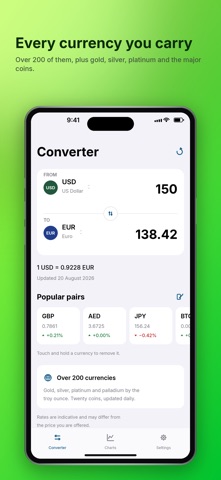


App Description
Expert Currency Converter converts every currency you are likely to need, plus gold, silver, platinum and the major cryptocurrencies. It is completely free — every feature, on every device, with no subscription, no trial and no limits. It opens on the pair that suits where you are, keeps working when you lose signal, and stays out of your way.
COMPLETELY FREE
No subscription. No in-app purchases. No paywall, no locked features and no daily limits. Everything below is included on iPhone, iPad, Mac, Apple Watch and in Messages.
CONVERTS WHAT YOU ACTUALLY CARRY
Around 180 currencies and assets, updated daily from the European Central Bank and a free public rates feed. Gold, silver, platinum and palladium are priced per troy ounce. Bitcoin, Ethereum and eighteen other coins are included.
WORKS WHERE YOU ARE
Rates are saved on your device, so the converter still answers on a plane, on a train, or anywhere the signal drops. The app tells you the date of the rates it is showing, so you always know how current they are.
CHARTS THAT SHOW THE TREND
Follow any pair over a week, a month, three months, six months, a year or five years. Press and hold to read any single day. Share a chart as a clean image.
A SUMMARY IN PLAIN LANGUAGE
Beneath the chart, a short description of what the rate has actually been doing. On a device with Apple Intelligence it is written on device by the built-in model — no chart data and nothing about you leaves your iPhone. On every other device a built-in summary is used instead, so the feature works everywhere rather than only on the newest hardware. It describes what the numbers have done; it is not advice and never predicts a price.
ASK FROM ANYWHERE
"Hey Siri, convert with Expert Currency." The Convert Currency action works in Shortcuts, from Spotlight and by asking Siri, and answers without opening the app. Press and hold the app icon for your top pairs, straight to the answer.
ON YOUR HOME SCREEN AND YOUR WRIST
A widget shows your chosen currencies at a glance, with the day's movement, in small, medium, large and Lock Screen sizes. The Apple Watch app converts on your wrist with a keypad, fetches its own rates and keeps its own base currency, so it works on its own when your iPhone is elsewhere.
IN YOUR CONVERSATIONS
Answer "how much is that?" without leaving Messages. The iMessage app puts the converted amount straight into