Multi Account Spaces

Multi Account Spaces Summary
Multi Account Spaces is a free, with in-app purchases iOS app in Social Networking by 娇龙 张. Released in Aug 2026 (1 month ago). Store last updated Sep 17, 2026
Multi Account Spaces SDKs Summary
App not yet scanned for SDKs.
0★
Ratings: 0
Screenshots

App Description
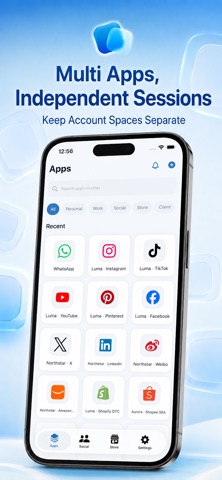
Multi Account is a local workspace for people who manage multiple web accounts, social channels, content plans, and online stores. Create separate web app entries, keep their sessions organized, and connect each entry to the social or store records you manage.
SEPARATE WEB SESSIONS
Create multiple entries for commonly used social, commerce, video, and collaboration websites. Each entry can have its own name, URL, category, and mobile or desktop browsing mode. Website sessions and cookies are stored separately for each entry, helping you keep work, personal, client, and store accounts apart.
ACCOUNT MANAGEMENT
Find accounts using a searchable app collection, aliases, categories, and recent activity. Update an entry, clear its website data, remove it, or link it with a managed social account or store.
WEB TOOLS
Use multiple tabs, in-page search, bookmarks, notes, downloads, and local file organization. When a website requests an upload, you can choose a file, photo, camera, or microphone only after granting the relevant system permission.
SOCIAL WORKFLOW
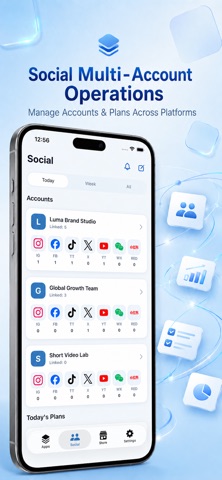
Create social projects, connect account records, schedule content plans, and organize copy, assets, hashtag groups, and quick replies. Optional local notifications can remind you about planned publishing times.
STORE WORKFLOW
Manage stores, SKUs, profit records, exchange rates, operating notes, and files. Profit records can include selling price, purchase cost, logistics, platform fees, advertising, and other costs for day-to-day reference.
LOCAL DATA AND BACKUP
Core workspace data is stored on your device. You can export a password-protected encrypted backup and restore apps, social records, stores, files, and preferences when needed. No developer account is required, and the app does not depend on a developer-operated server to sync workspace data.
[Description of Automatic Subscription Service]
1, Subscription price: monthly subscription,
2. Payment: After the user confirms the purchase and makes the payment, it will be credited to the iTunes account
3. Apple iTunes account will deduct the fee within 24 hours before expiration, and the subscription period will be extended by one subscription period after successful deduction
4. If you want to cancel the subscription, please open the "Settings" of the iPhone --> enter the "iTunes Store and App Store" --> click "Apple ID", select" View Apple ID", enter