EarShot: AI Coding by Voice

EarShot: AI Coding by Voice Summary
EarShot: AI Coding by Voice is a free, with in-app purchases iOS app in Developer Tools by Millennial Apps, LLC. Released in Oct 2026 (recently released ago). Store last updated Oct 19, 2026
EarShot: AI Coding by Voice SDKs Summary
App not yet scanned for SDKs.
0★
Ratings:
Screenshots


App Description
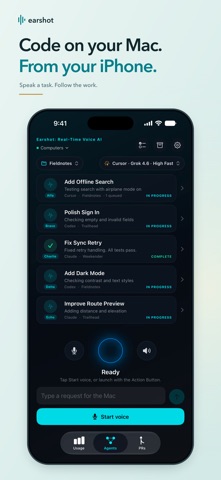
EarShot connects your iPhone or iPad to Claude Code, Codex, and Cursor on your Mac. Choose a project, start tasks by voice or text, and manage multiple coding agents in one place.
Requires a Mac running the free EarShot coordinator and at least one supported coding CLI.
YOUR CODING TOOLS, WITH YOU
Pair with a QR code or connection code. Save multiple Macs and switch between them. Choose an agent, available model, and effort level for each task. Pick a project, or let EarShot match your request to one. Describe a change, ask for a fix, or ask about your existing work.
SEE PROGRESS AT A GLANCE
Follow multiple agents in one list, with live status, task history, results, and pull request links when available. Hear task updates aloud while using the app. Enable notifications for completion, blocked, and failed alerts when voice is off.
QUEUE THE NEXT STEP. STEER THE CURRENT ONE.
Queue a follow-up to run after the current step finishes, or steer an agent immediately. Stop running work, continue a saved task, and archive finished agents to History. The Requests checklist shows what happened to your instructions and lets you retry unfinished operations or undo an archive.
VOICE ON YOUR TERMS
Opening EarShot does not start listening. Tap Start voice, use the Start Earshot shortcut, or assign it to the Action Button on a compatible iPhone. Choose an assistant voice and speaking style, including concise radio-style updates. Prefer typing? Send a text request with voice on or off.
Voice sessions can continue in the background and end automatically after 10 minutes of inactivity. Tap Start voice to reconnect.
CHOOSE YOUR WORKSPACE
Use a separate Git worktree and branch by default, or edit an existing checkout in Working directory mode. Worktree mode prepares code changes for review through GitHub pull requests. Working directory mode edits in place without automatically committing or publishing.
Agents run with CLI approval prompts disabled and can access files and credentials available to your Mac account. A worktree separates Git changes but does not restrict that access. Review their work; stopping an agent does not undo changes already made.
SETUP AND REQUIREMENTS
Install the free Mac coordinator at earshotrealtime.com and configure Claude Code, Codex, or Cursor. Your Mac must stay online for requests and coding tasks. Available models depend on your Mac setup