Later: Screen Time App Blocker

Later: Screen Time App Blocker Summary
Later: Screen Time App Blocker is a free, with in-app purchases iOS app in Tools by 晓晖 王. Released in Oct 2026 (recently released ago). Store last updated Oct 9, 2026
Later: Screen Time App Blocker SDKs Summary
App not yet scanned for SDKs.
0★
Ratings: 0
Screenshots



App Description
It's gone eleven, and your thumb is hovering over a shopping app again. It's half past two, and you've opened the same social app four times in twenty minutes. Nothing's wrong, exactly. Everything is just always there.
Later is a gentle app blocker. It holds back the apps and websites you choose, for as long as you choose — and when you open one, it doesn't say "no". It says "later".
# A GENTLE CHECK-IN
Most app blockers put up a stern red screen and hope you'll stay scared of it. Later takes a different view. By default, stopping a plan early asks for a quick check-in with Face ID, Touch ID, or your passcode. No puzzles, no tags to tap, no countdowns to sit through — just a small, deliberate pause to ask yourself: is this really what I want right now?
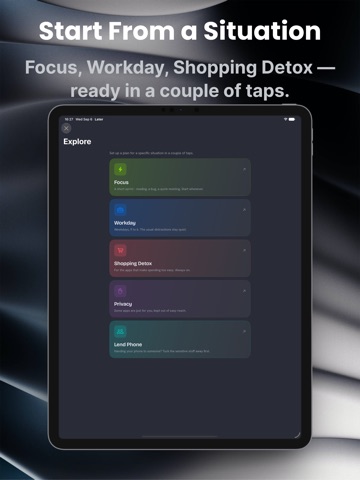
# START FROM A SITUATION
Pick a ready-made plan in Explore, choose your apps, and you're done:
• Focus — A short sprint: reading, a bug, a quick meeting
• Workday — Weekdays, nine to six, with a break when you need one
• Shopping Detox — For the apps that make spending far too easy
• Privacy — Some apps are just for you
• Lend Phone — Tuck the sensitive things away before you hand it over
Or build your own from scratch.
# PLANS THAT FIT YOUR LIFE
• Block apps, whole categories, and websites — in Safari too
• Or allow only the few apps you choose
• Schedules that start and stop on their own, even overnight
• Choose how each plan ends: freely, with a check-in, on a timer, with a pause, or with a few short exceptions
• Timed breaks without ending the plan
• Optional protections: no deleting or installing apps mid-session
• Emergency Unblock for the moments you genuinely need out
# A VOICE, NOT A WALL
When you open a blocked app, Later says something — in one of four voices: Later's own gentle voice, Work, Detox, or Privacy. The same voice carries through to reminders and break notifications.
# MAKE IT YOURS
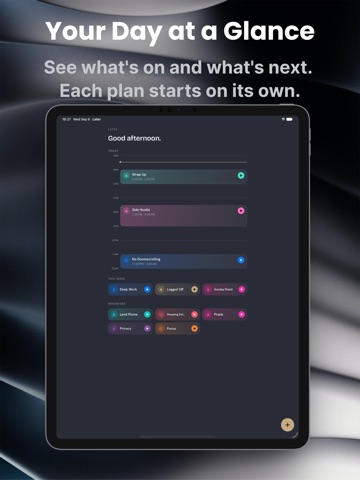
Later's default amber is the colour of the cat in its icon, halfway out of the door. Keep it, or mix any of 24 accents with any of 30 backgrounds. Each plan has its own colour, too, carried through to its card, widget, Live Activity, and shield screen. And choose how your plans are laid out: Classic, Stack, or Timeline.
# ALWAYS WITHIN REACH
• Live Activities on the Lock Screen and in the Dynamic Island
• Home Screen and Lock Screen widgets
• Shortcuts ac