Focus by ConciergePad

Focus by ConciergePad Summary
Focus by ConciergePad is a free iOS app in Productivity by OnlineRene LLC. Released in Sep 2026 (1 month ago). Store last updated Sep 7, 2026
Focus by ConciergePad SDKs Summary
App not yet scanned for SDKs.
0★
Ratings:
Screenshots

App Description
Focus helps your family stick to the focus schedule you've agreed on together. During those times, distracting apps simply take a break on the student's iPhone, so homework, reading, dinner, or a good night's sleep get the attention they deserve. Everything else about the phone keeps working. Phone calls and Messages always stay available, so you can reach each other any time, and emergency features are never affected.
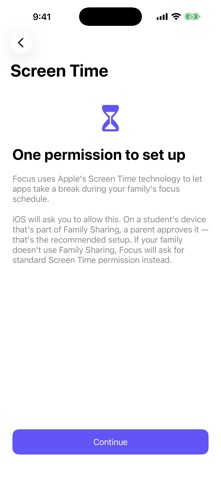
Focus is built on Screen Time technology by Apple. That means no workarounds and no third-party tricks: iOS itself lets apps take a break during focus time, and iOS asks for permission before anything starts. On a student's device that's part of Family Sharing, a parent approves that permission, which is the setup we recommend. If your family doesn't use Family Sharing, Focus asks for standard Screen Time permission instead.
Setting up takes a few minutes. Sign in with your ConciergePad family account to link the device to your family's focus schedule, approve Screen Time when iOS asks, then choose the apps that should always stay available. Anything you put on that list, from a calculator to a music app to a ride-share app, keeps working during focus time. Everything else takes a break. You can change the always-available list whenever you like from the Focus home screen.
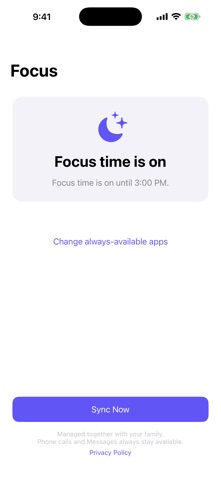
The schedule itself is something your family sets together in your ConciergePad account, and it can be as simple as weekday mornings or as specific as a different window for each day. The Focus home screen always shows what's happening in plain language: "Focus time is on until 3:00 PM," "Next focus time: tomorrow at 8:00 AM," or "Ready to go" while you're waiting for the first schedule to arrive. A Sync Now button pulls the latest settings on demand, and Focus keeps working with the last schedule it saw even when the device is offline.
Life doesn't always follow a schedule, and Focus is designed for that. If a student opens an app that's taking a break, the screen explains that it's focus time, reminds them that calls and Messages always work, and offers a button to ask for an early unlock. That request goes straight to the family's ConciergePad account. A parent can pause the whole schedule at any time, for a doctor's appointment, a snow day, or simply because you've decided to. The device picks the pause up on its next sync, or right away when the student taps to ask