Widgets, Cast Video - Car Dash

Widgets, Cast Video - Car Dash Summary
Widgets, Cast Video - Car Dash is a free iOS app in Maps And Navigation by SEAMOBI TECH PTE LTD. Released in Sep 2026 (2 months ago). It has 136 ratings with a 4.81★ (excellent) average. Based on AppGoblin estimates, it reaches roughly 2.4K monthly active users . Store last updated Nov 21, 2026
Recent activity: 105 new ratings this week View trends →
SDK intelligence: AppGoblin detected 4 development tools(e.g. Google), 3 ad networks, 2 business tools, 1 analytics: attribution,and 1 analytics: product integrated into Widgets, Cast Video - Car Dash. View full SDK list →
Widgets, Cast Video - Car Dash SDKs Summary
Widgets, Cast Video - Car Dash was last scanned for SDKs on 2026-11-22. Below is the overview of third-party companies detected in the app. The full list of SDKs, permissions and unknowns is available here.
 Snap
 Google
 Facebook
 Airbnb Engineering
 nanopb
 Alamofire
 AppsFlyer
 Spotify Technology S.A.
 ThinkingData
 Firebase
4.81★
Ratings: 136
Screenshots


App Description
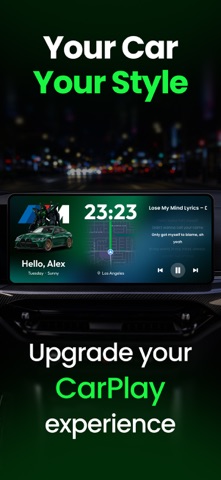
You love your car, You want your CarPlay screen to reflect your unique style.
Now you can customize your commute with custom widgets, tailored layouts, and thrilling startup sounds!
No CarPlay, no problem, you can also turn your phone into a smart dashboard instantly.
Whether you want to see your favorite family photos on your screen, add functional widgets, or hear an aggressive engine roar the moment you start your vehicle, this app gives you complete control over your car's digital aesthetic.
How to customize my CarPlay screen?
1. Custom your widgets.
2. When you're not driving, go to the Settings app on your iPhone. Tap General, tap CarPlay, then tap your car.
3. Add widgets.
Can I use this if my car doesn't have a touchscreen display?
This app can cast custom widgets directly to your vehicle's native CarPlay display.
Yes, Designed specifically for drivers of classic cars. Just mount your phone, open the app, and you have instant access to everything you need for the road in one clean, distraction-free interface. You can navigate and control your music playing without swithing many apps.
How to make every trip exciting with startup sounds?
Thrilling startup engine sounds that automatically trigger the moment your phone connects, giving even a quiet daily commuter the roar of a supercar.
A massive library of audio options to perfectly match your mood, vehicle type, or personal style.
How does this app elevate my road trips and daily commutes?
- Automated driving log: Effortlessly record your mileage, routes, and total travel time.
- Smart dashboard: Integrate maps, media, and calls onto a single screen to eliminate dangerous app-switching on the highway.
- Easy-to-tap buttons: Control media plays effortlessly to keep your hands on the wheel and eyes on the road.
- Precise GPS speedometer: Real-time speed with pinpoint accuracy to avoid speeding tickets, drive with confidence.
Premium access
To access all the premium features of Car Connect, you need to subscribe or pay once for lifetime access via your iTunes account. You can manage your subscriptions from your Account Settings.
DISCLAIMER
This app is not affiliated with, endorsed by, or connected to Apple Inc. or any specific vehicle manufacturers. While certain features are designed to integrate with Apple CarPlay, this app can operates independently without a CarPlay connection.
Policy Privacy
Data also available via the AppGoblin MCP and API (/api/v1/apps/{store_id}).