Timbo: AI Calendar, To Do List

Timbo: AI Calendar, To Do List Summary
Timbo: AI Calendar, To Do List is a free iOS app in Productivity by Dmitriy Biserov. Released in Sep 2026 (1 month ago). It has 11 ratings with a 5.00★ (excellent) average. Based on AppGoblin estimates, it reaches roughly 274 monthly active users . Store last updated Oct 9, 2026
Recent activity: 3.00 new ratings this week View trends →
Timbo: AI Calendar, To Do List SDKs Summary
App not yet scanned for SDKs.
5★
Ratings: 11
Screenshots


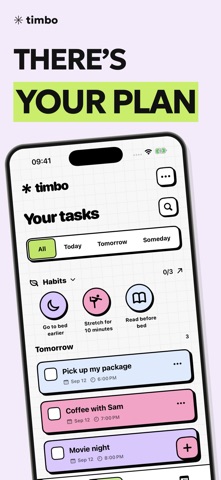
App Description
Hi! I'm Dima. You might know me from my apps Zebra and Eva. Now I've made Timbo, a personal assistant you can ask to handle things with your voice. No more typing.
Tap the microphone and say:
“When does the next Avengers movie come out? Find the date and remind me the day before.”
Timbo will find the date and create a reminder. You just need to decide who to go with :)
Or try these, also with your voice:
- “Remind me to submit my meter readings on the 25th of every month”
- “Remind me to start the washing machine when I get home”
- “Remind me to reply to Max when I get to work”
- “Remind me to change the sheets every Sunday at 10 a.m.”
- “Remind me to check if the plants need watering every Saturday”
- “Remind me to pay the internet bill on the 10th of every month”
- “Remind me to call my parents every Sunday at 6 p.m.”
- “Remind me to choose my bank's cashback offers on the first of every month”
- “Remind me to cancel my trial subscription in a week”
- “Add coffee, milk, and cat food to my shopping list”
- “Create a habit of going to bed earlier and remind me at 10:30 p.m.” — especially handy when you're about to watch just one more episode
If it's not a good time to talk, you can type in the chat instead. You can always edit a task yourself later: change the text, date, or reminder.
REMIND ME AT HOME OR WORK
Add your home or workplace to Places, then follow Timbo's instructions to set up a Wi-Fi automation in the Shortcuts app. The reminder will go off when you connect to the selected network. You can set up a separate automation for when you disconnect, too.
TASKS ON YOUR LOCK SCREEN
Turn on Live Activity to see up to three of today's tasks, with their times and the next reminder. Mark a task complete right from the card and the next one will take its place.
YOUR PLANS AT A GLANCE
Switch between day, week, and month views to see when you're busy and where you can fit in another meeting. Drag tasks to another day and rearrange them in the calendar. Widgets show today's, tomorrow's, and upcoming tasks right on your iPhone screen.
Looking forward to something? Set up a countdown. You can put it on your Home Screen or Lock Screen, too.
TIME TO FOCUS
Choose a task and start the focus timer. Set your work and break times, turn on background sounds, and see how much time you've spent on the task. Th