SpendingLens - Expense Tracker

SpendingLens - Expense Tracker Summary
SpendingLens - Expense Tracker is a mobile iOS app in Finance by HUAXIA TANG. Released in Sep 2026 (1 month ago). Store last updated Sep 27, 2026
SpendingLens - Expense Tracker SDKs Summary
App not yet scanned for SDKs.
0★
Ratings: 0
Screenshots



App Description
See where your money really goes -- without compromising your privacy.
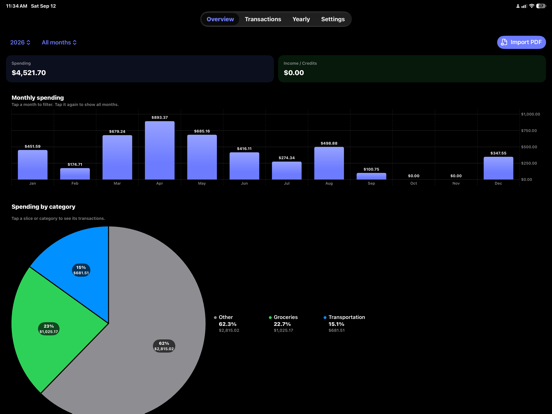
SpendingLens turns your PDF bank and card statements into clear, actionable financial insights. With on-device parsing, OCR, and interactive charts, SpendingLens lets you analyze spending habits, track categories, and review multi-year trends without uploading financial records to third-party servers.
No accounts to create. No bank passwords to link. No subscriptions. Just private financial clarity right on your iPhone and iPad.
----------------------------------------
WHY SPENDINGLENS?
----------------------------------------
Most finance apps require linking bank accounts or uploading statements to remote servers, exposing sensitive transaction history to third-party aggregators and advertisers.
SpendingLens takes the opposite approach. Built specifically for Apple platforms, all document processing, OCR scanning, transaction extraction, and analytics happen 100% locally on your device using native Apple frameworks. Your financial data remains entirely yours.
----------------------------------------
KEY HIGHLIGHTS
----------------------------------------
100% PRIVATE & ON-DEVICE
- Zero tracking: No ads, no third-party analytics SDKs, and no cloud servers.
- No bank logins: Works directly with the PDF statements you already have.
- Local storage: All transactions and rules are stored securely on-device with SwiftData.
SMART STATEMENT IMPORT
- Digital & Scanned PDFs: PDFKit extracts text from digital statements; Vision OCR reads scanned copies.
- Batch Import: Process multiple statements at once from Files or iCloud Drive.
- Smart Dates: Handles statements spanning year boundaries (e.g., Dec to Jan).
- Duplicate Protection: Skips duplicate files while preserving legitimate recurring purchases.
INTERACTIVE CHARTS & OVERVIEW
- Clean Dashboard: Inspect total spending, income/credits, and net period flow.
- Instant Filtering: Filter by Year, Month, and Category right from the overview bar.
- Monthly Charts: Tap any month to isolate transactions or tap again to view full-year trends.
- Category Breakdowns: Interactive charts highlight top spending areas with percentages and totals.
CATEGORIZATION & RULES
- Auto-Recognition: Automatically assigns common merchants into intuitive categories.
- Custom Rules: Define keyword rules to categorize specific merchants your way.
- Review Flags: