1C Big Keyboard

1C Big Keyboard Summary
1C Big Keyboard is a free, with in-app purchases iOS app in Productivity by Gamos Mobile Limited. Released in Oct 2026 (recently released ago). Store last updated Oct 30, 2026
1C Big Keyboard SDKs Summary
App not yet scanned for SDKs.
0★
Ratings:
Screenshots


App Description
I am 58 and my vision is far from perfect. I have fingers on my hands - not matchsticks, so I designed this keyboard for myself. If you’re under 35 and have no problems with vision, please do not install. You will need it later. But maybe it will be a good lifehack for your parents now.
Eugene Sotnikov, 1C Wearable
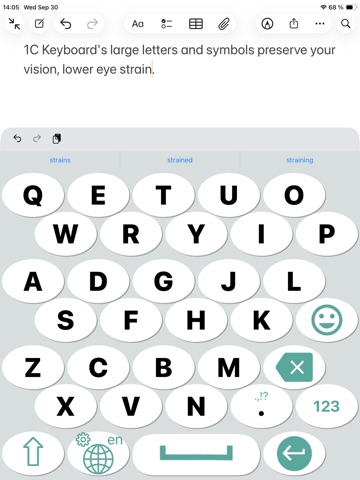
This ergonomic keyboard allows using 100% of your phone’s screen for big keys making it indispensable on small screen devices and for fat fingers (100% is not an advertising slogan: it is literally 100%).
This big keyboard preserves your vision and reduces eye strain.
Big keyboard keys are easier to hit – less typos.
The layout of this large keyboard is easy to learn – it’s a QWERTY keyboard smartly compressed into extra large keyboard, what makes it ideal for large hands.
How to install the keyboard:
Open System "Settings". Tap General -> Keyboard -> Keyboards -> Add New Keyboard -> 1C Big Keyboard
How to use the keyboard:
1. Tap the "globe"/menu key in the keyboard to switch keyboards, change the current languages, or open quick keyboard controls.
2. Tap and hold a letter to enter diacritical marks and alternative characters.
3. Long press the space key to move the cursor.
4. Swipe left or right to switch between the languages selected in settings.
The list of supported languages:
English
Deutsch
Français
Español
Italiano
Русский
Қазақ
Dansk
Svenska
Português
한국어
Čeština
Polski
Türkçe
Українська
Беларуская
日本語 (平仮名)
日本語 (カタカナ)
日本漢字 (On'yomi)
日本漢字 (Kun'yomi)
中文(繁體)倉頡
中文(简体)倉頡"
中文(繁體)拼音
中文(简体)拼音