What is my hearing age?

What is my hearing age? Summary
What is my hearing age? is a free, with in-app purchases iOS app in Entertainment by Marcos Vidal Fernandez Heras. Released in Oct 2026 (recently released ago). Store last updated Oct 8, 2026
What is my hearing age? SDKs Summary
App not yet scanned for SDKs.
0★
Ratings: 0
Screenshots




App Description
3 free tests. Then a one-time purchase unlocks unlimited tests and all tones. No subscription or ads.
Choose your colors, listen and tap. Play together in person with 1–8 players on one phone.
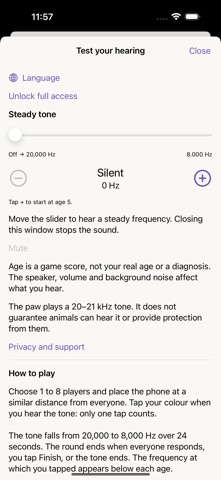
Each colored area is one player. Everyone hears the same tone. Tap Start: the tone descends from 20,000 to 8,000 Hz over 24 seconds. Tap your color once when you hear it. Each area has a progress bar and locks after your response.
The round ends when everyone responds, Finish is tapped or time expires. With one player, Finish also records your response. Results show a recreational age score and the exact frequency at your tap.
Information includes a fixed-tone slider from 8,000 to 20,000 Hz, its age score and +/− controls that adjust by one game-year. Closing the window stops the sound. The paw toggles a repeating 20,000–21,000 Hz sweep.
The game works offline. Buying access requires App Store and an internet connection. Existing purchases are recognized automatically. No registration or ads. Available in Spanish, English, French, Italian, German, Portuguese and Polish.
The age from 5 to 100 is a game score, not your actual age or a clinical hearing assessment. This app does not diagnose, treat or prevent medical conditions. Speaker performance, volume, distance and noise affect the result. Consult a qualified healthcare professional if you are concerned about your hearing.
Use a low, comfortable volume and brief sessions. Stop if uncomfortable. Do not increase volume to try to hear a frequency. The paw does not guarantee animal responses and is not a repellent or protection device.
Purchasing or restoring access requires an App Store connection. Existing purchases are recognized automatically. To recover a previous purchase, use “Restore purchase” on the unlock screen. Compatible with iPhone and iPad.