Photo To PDF: Doc Scanner

Photo To PDF: Doc Scanner Summary
Photo To PDF: Doc Scanner is a free, ad-supported, with in-app purchases iOS app in Productivity by Bhavik Gevariya. Released in Oct 2026 (recently released ago). Store last updated Oct 1, 2026
Photo To PDF: Doc Scanner SDKs Summary
App not yet scanned for SDKs.
0★
Ratings: 0
Screenshots



App Description
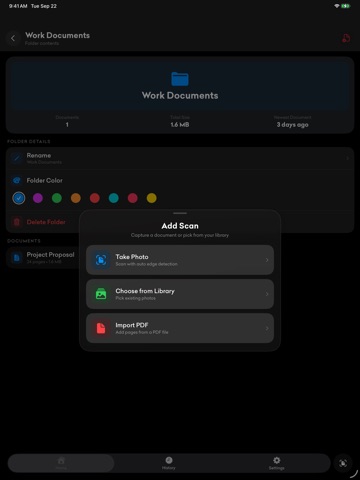
Photo To PDF turns the photos and paper around you into clean, shareable PDFs. Point the camera at a receipt, a contract or an ID card, or pick images you already have, and you get a properly cropped, properly sized document in seconds. It all happens on your iPhone or iPad, offline.
SCAN ANYTHING
• Auto edge detection finds the page and crops it for you
• Auto-enhance fixes lighting and contrast on every capture
• Color, grayscale and black & white modes
• Flash, grid overlay, HDR, stabilization and a capture timer
• ID Card mode lays the front and back of a card onto one page
• Capture one page or a whole stack in a single session
PHOTOS INTO ONE PDF
• Pick any number of photos from your library and merge them into one document
• Import an existing PDF to add its pages or keep it in your library
• JPG, PNG and HEIC in, PDF out
EDIT BEFORE YOU EXPORT
• Crop and rotate any page
• Drag pages into the order you want
• Add or remove pages at any time
• Rename a document and give it a color
READ THE TEXT OFF A PAGE
• On-device text recognition pulls the words out of any scan
• Copy the text, or share it straight from the sheet
• Nothing is sent anywhere to do it
SIGN WITH YOUR OWN SIGNATURE
• Draw your signature once, in the color you want
• Drop that same signature onto any page, then size and place it
• Saved signatures stay on the device
KEEP IT ORGANIZED
• Folders, plus Recents, Favorites and Imported filters
• Search by name, or say what you are looking for with voice search
• History shows what you created and when
• A storage screen shows exactly what the app is using
WIDGETS AND SHORTCUTS
• Home Screen widgets: Documents, Document Previews, Quick Actions and Document Count
• Lock Screen widgets and Control Center buttons
• Siri and Shortcuts: scan, import, search and open your latest scan by voice
• Save to Photo To PDF from any app's share sheet
PRIVATE BY DESIGN
• Your documents stay on this device. Nothing you scan, and no text read from it, is ever uploaded
• Optional 4-digit passcode with Face ID or Touch ID
• Auto-lock immediately, or after 1, 5 or 15 minutes
• Works with no internet connection at all
THIRTEEN LANGUAGES
English, German, Spanish, French, Hindi, Italian, Japanese, Korean, Portuguese (Brazil), Russian, Thai, Turkish and Simplified Chinese.
FREE AND PRO
Free gives