beCraftsmanToolbox

beCraftsmanToolbox Summary
beCraftsmanToolbox is a free iOS app in Tools by Sebastian Ritter. Released in Oct 2026 (recently released ago). Store last updated Oct 17, 2026
beCraftsmanToolbox SDKs Summary
App not yet scanned for SDKs.
0★
Ratings: 0
Screenshots




App Description
beCraftsmanToolbox bundles practical tools for DIY users and tradespeople. Designed throughout for one-handed use, so your other hand stays free for the job.
COMPASS WITH FREELY SELECTABLE TARGET DIRECTION
Classic 2D compass rose or AR camera view, aimed at north, a saved place, or the current (or freely chosen time's) position of the sun and moon as a photo-spot finder.
GPS POSITIONING
Navigate to a freely entered target coordinate (decimal degrees or degrees/minutes/seconds) – the AR view shows direction and distance, whether for geocaching, a job site in undeveloped terrain, or finding your way back.
MEASURING TAPE IN THREE VARIANTS
AR measuring tape for short, precise distances via camera; GPS distance and GPS area measurement for larger distances and areas.
LEVEL AND ANGLE GAUGE
Horizontal bubble level and vertical tilt angle, with permanent and temporary calibration against design-related tilt.
ROOM SURVEY
Scan a room (Pro devices) and automatically calculate the net wall area and the wallpaper rolls needed – furniture is ignored, doors and windows are deducted automatically.
TIME TRACKING WITH GPS
Log work hours per job, including the job site, with a reminder when leaving the site and export as a timesheet.
NOISE METER
Measure the current volume in dB or log it over a period (maximum, average, events above threshold), including export.
FLASHLIGHT WITH PHOTO FUNCTION
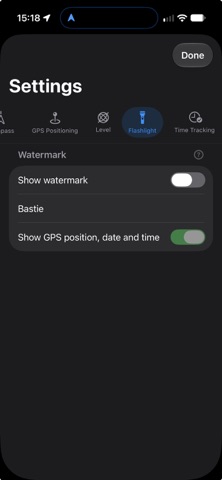
LED light and photo capture in one view, optionally with a watermark (text, GPS position, date/time) – handy for when you're back under the sink in the dark.
MAGNIFIER
Use the magnifier e.g. for nameplates or small print, with stepless zoom via swipe gesture.
NO FRILLS
• No user accounts, no ads
• All locally stored data can be fully deleted at any time