Mission Alarm Clock Pro

Mission Alarm Clock Pro Summary
Mission Alarm Clock Pro is a free, with in-app purchases iOS app in Tools by CloudEx Inc.. Released in Oct 2026 (1 month ago). Store last updated Oct 1, 2026
Mission Alarm Clock Pro SDKs Summary
App not yet scanned for SDKs.
0★
Ratings: 0
Screenshots



App Description
Mission Alarm Clock Pro keeps ringing until you complete a mission: solve math, shake your iPhone or scan a barcode in another room. Once your brain and body are moving, you won't fall back asleep. Reliable alarms, sleep tracking and a snore recorder in one app.
■ MISSIONS TO STOP THE ALARM
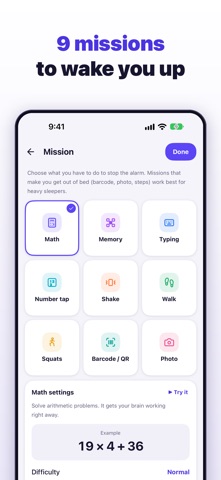
9 missions with adjustable difficulty and count. Chain up to 5.
• Math: from addition to multiplication
• Shake: shake your iPhone
• Barcode/QR: scan a registered item, like your toothpaste
• Photo: snap a registered spot, like your sink
• Walk: take a set number of steps
• Squats: squat holding your iPhone
• Memory: tap the tiles that lit up
• Typing: type a sentence exactly (no pasting)
• Number tap: tap numbers in order
Try them first in silent practice mode.
■ RINGS EVERY TIME
Alarms are scheduled with iOS alarms (AlarmKit), so they ring in Silent mode and during a Focus, even when the app is closed. The alarm shows on the Lock Screen and in the Dynamic Island. If you tap Stop without solving the mission, it rings again a few seconds later.
■ ALARM CHECK
Checks the alarm and notification permissions so you can fix problems before morning, and includes a test alarm in about a minute.
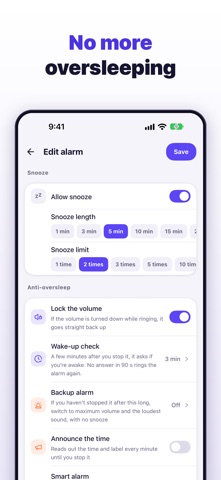
■ NO MORE OVERSLEEPING
• Volume lock: while the ringing screen is open, turning the volume down snaps it back
• Snooze limits: every 1 to 30 minutes, 1 to unlimited times
• Wake-up check: miss "Are you awake?" and it rings again with a mission
• Sound pauses while you solve a mission and resumes if you stop
• Backup alarm: loud sound and no snooze if not stopped in time
■ SAFETY EXITS
Emergency stop (it keeps ringing while you wait), a maximum ringing time, and a math fallback if a camera mission keeps failing.
■ REPEATS AND DAYS OFF
Weekdays, every N weeks, every N days for shift work, a monthly date or the last day, the Nth weekday, or specific dates. Skip the next alarm, add your own days off or pause all alarms with vacation mode. Japanese public holidays are built in.
■ SOUNDS AND VIBRATION
Built-in tones, a loud siren and buzzer for deep sleepers, or your own music from the Files app, with per-alarm volume, a gradual rise and 5 vibration patterns.
■ SLEEP TRACKER AND SNORE & SLEEP TALK RECORDER
With your iPhone by the pillow, the microphone and motion sensor estimate sleep stages (awake, light, deep), sleep score, awakenings and sno