Expreem - Meet New People Nearby, Find Friends and Local Activities

Expreem - Meet New People Nearby, Find Friends and Local Activities Summary
Expreem - Meet New People Nearby, Find Friends and Local Activities is a mobile iOS app in Social Networking by Expreem. Released in Mar 2014 (12 years ago). It has 3.00 ratings with a 4.67★ (excellent) average. Based on AppGoblin estimates, it reaches roughly 43 monthly active users . Store metadata: updated Apr 25, 2015.
Store info: Last updated on App Store on Apr 25, 2015 .
4.67★
Ratings: 3.00
Screenshots


App Description
“A brilliant revolution-evolution in photo sharing and social interaction.“
“Goodbye likes: how many Connects can you attract?”
Expreem, through an innovative concept to share photos, helps you to create a geosocial network whose features are progressively enriched depending on distance and countdown status linked to individual posts.
How does it work:
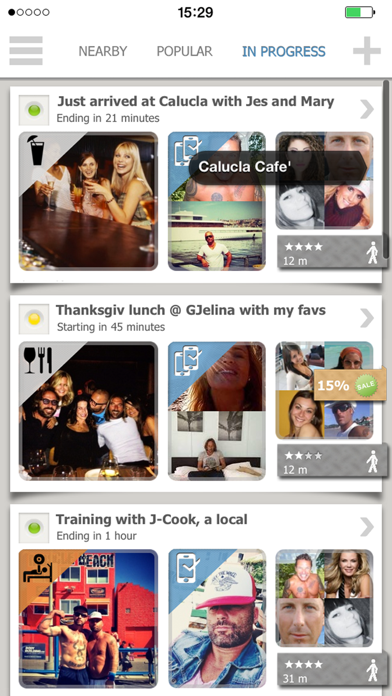
● Each photo posted is enriched by a location and an icon that defines the moment category and how long you will be physically in that place (eg: "I’m having lunch at Kreation in Venice Beach for 45 minutes more"). Once the photo is posted, the countdown starts. The photos that are still in the countdown period are listed in the “In Progress" filter.
● According to their current distance, different users will see different interaction features: the closer they will be able to get, before the countdown ends, the more their menu will enrich with new interaction features and content adding capabilities.
● The main functions are 12. The 5 “basic” functions are always available to anyone (Comment, Like, Share, Invite, Get Updates), while the other 7 functions (Approach, Check-in, Synch, Add Photos, Connect, Chat, Unlock Promotion) are progressively activated according to how close one is getting.
Specifically: "Approach" is active beyond 18 mi, "Check-in" between 18 mi and 430 yd, "Synch" within 430 yd, "Connect", "Add Photo" and "Unlock Promotion" get activated only after a ”Synch" is confirmed.
The chat begins to be available only after you have made a ”Connect" with someone. The more people interact during countdown period, the more the photo gets popular, and to be more specific, the more the interactions are made with features like “Synch”, “Connect” and “Add Photo”, the more popular it will get. This probably makes it sound like the comments and likes you usually receive on your photos, seem quite a thing of the distant past !
● Connect works like this: when people are physically in the place where the photo was posted, they can confirm "Synch", afterwards they become "available" in the Connect list. The Connect allows to establish that you just entered in a space-time proximity relationship with another person, and from that point on, you can start a chat conversation (eg, “Is it you the one sitting at the table with the cuban cigar? May I come to drink m