AnyFont
AnyFont Summary
AnyFont is a with in-app purchases iOS app in Tools by Evo Tec Labs @ Pepperbit Online. Released in Feb 2014 (12 years ago). It has 46K ratings with a 4.48★ (good) average. Based on AppGoblin estimates, it reaches roughly 130.7K monthly active users and generates around $<10K monthly revenue (100% IAP / 0% ads). Store metadata: updated Jul 31, 2024.
Recent activity: 10 new ratings this week View trends →
Data tracking: SDKs and third-party integrations were last analyzed on Apr 5, 2025.
Store info: Last updated on App Store on Jul 31, 2024 .
4.48★
Ratings: 46K
Screenshots



App Description
*** COMPATIBLE WITH WORD, EXCEL AND POWERPOINT FOR IOS ***
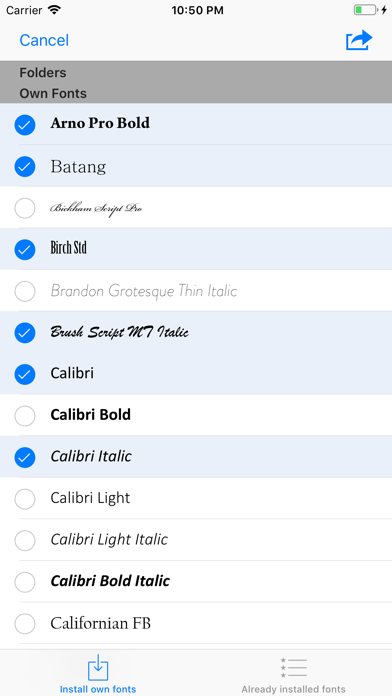
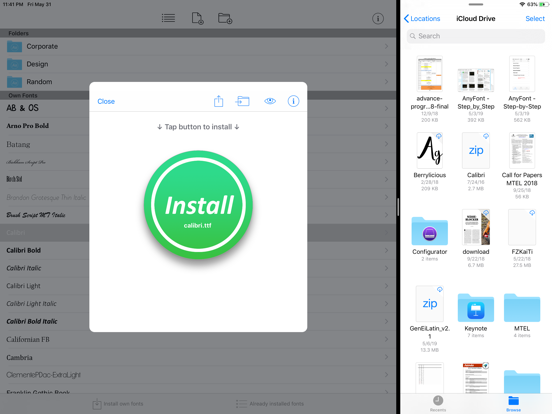
With AnyFont it is finally possible to install any additional font in TrueTypeFont- (.ttf), OpenTypeFont- (.otf) or TrueType Collection- (.ttc) format on your iPhone or iPad. These fonts can then be used throughout the system in other apps like Word, PowerPoint, Pages, Keynote and many more.
No more unexpectedly replaced fonts in presentations because the iPhone or iPad does not know them. The perfect solution for everybody who creates presentations on a Mac or PC to show them on their iPad.
Extremely easy to use. An extensive FAQ and an introductory tutorial help you to understand the app.
Check out this video tutorial: https://www.youtube.com/@AnyFont-iOS
Features:
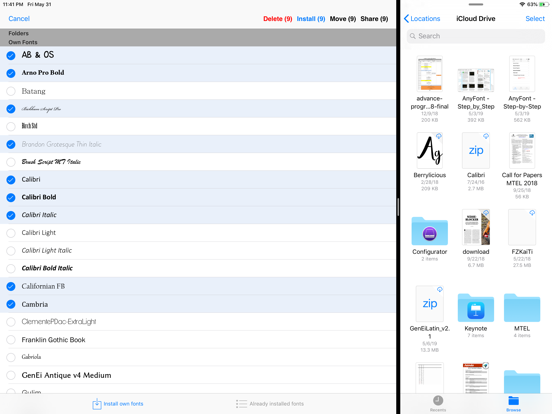
- Add new fonts as .ttf, .ttc or .otf file using iTunes file sharing or the „Open in…“ dialog from other apps like Mail or Dropbox
- Add single fonts or multiple fonts as a ZIP- or TTC-file
- Install single fonts or multiple fonts at once
- Preview your fonts in AnyFont’s storage
- Access FontBundles.net from within AnyFont
- Optional bundle of 1,000+ fonts (In-App Purchase)
- Complete list of all installed fonts on the device
- Support for Dark Mode (requires iOS 13)
Working with:
- Word, Excel and PowerPoint
- Numbers, Keynote and Pages
- Cricut Design Space
- Office Suite Pro
- Office²HD
- and many other apps!
AnyFont website: https://www.anyfont.app
Tutorial Video: https://www.youtube.com/@AnyFont-iOS
NOTE: It is not possible to change the system-font on your device with AnyFont. With AnyFont you can install additional fonts on your device which can then be used by other apps which make use of the device's font book.
NOTE II: Some fonts using Cyrillic or Asian characters may not be supported by this way of installing fonts due to their size. The maximum size of a configuration profile for a font is 20 MB.
NOTE III: You don't have to purchase the optional font bundle to use AnyFont. You can always add your own fonts to install them on your device.