Photo Image Quick Editor

Photo Image Quick Editor Summary
Photo Image Quick Editor is a ad-supported, with in-app purchases iOS app in Photo And Video by aZeR DiLLs. Released in Nov 2014 (11 years ago). It has 28 ratings with a 3.93★ (average) average. Based on AppGoblin estimates, it reaches roughly 8.00 monthly active users and generates around $<10K monthly revenue (22% IAP / 78% ads). Store metadata: updated Oct 10, 2023.
Store info: Last updated on App Store on Oct 10, 2023 .
3.93★
Ratings: 28
Screenshots

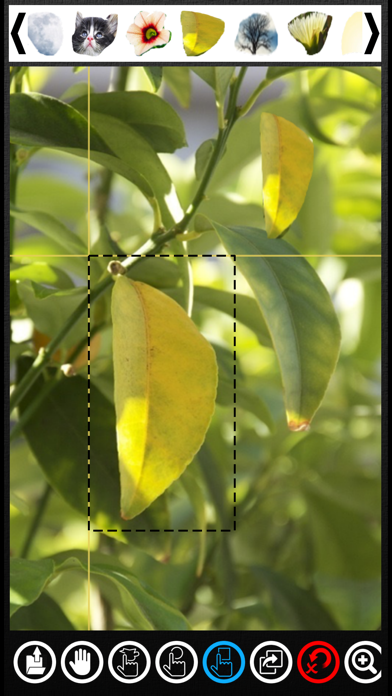


App Description
Photo Image Quick Editor is an easy to use App that allows user to quickly Create, Copy, Paste, Resize or Replicate multiple snippets between photos & images from the Photo Library.
Imagine trying to create multiple snippets from various images & try to paste them into a particular image one by one, it will be really tedious & time consuming. With Photo Image Quick Editor App, everything will be fast, easy & definitely seamless for everyone. Here's how & why:
1. Snippets can be created by using one of the selection tools; freehand, rectangle or round. Select an area by just tapping & panning the desired area. A location placeholder (with horizontal & vertical bar) will be shown for easy reference while creating the selection area.
2. Once selected & confirmed, this selected area or snippet will be available for selection at the top view via the snippet selector. Create as many snippet as required & the snippet selector will be filled accordingly. Browse through these snippets using the left & right arrows.
3. Once snippet is available, user can start pasting it to the currently opened image in the working area.
4. Just drag & drop the required snippet from the snippet selector onto the current working image.
5. Pasted snippet can be rotated (use 2-finger touch & rotate) & scaled (use 2-finger panning) as required. Snippet can also be moved around the image easily (single touch & drag). ** Note that one of the selector tools have to be selected while using these features (don't use the Hand tool as this is only for moving / scrolling the current image around the working area & not the pasted snippet).
6. Delete unwanted snippet easily by double tapping the snippet on the working image.
7. User have the option to reset the working area by clearing all the snippets created or snippets on the image or can just clear everything to start fresh.
8. Zoom-In & Out features can be used on the working image as required. **Use bigger image to get higher precision on the selection area especially when using the freehand tool while creating snippets.
9. When all snippets are pasted into the new image, user can preview the image where there will be option to Save the image to the device Photo Library or share it directly via any installed & standard Apps like Files, Facebook, Twitter, Dropbox, etc. User can also send it straight away to another device via AirDrop