IFR Flight Trainer Simulator

IFR Flight Trainer Simulator Summary
IFR Flight Trainer Simulator is a free, with in-app purchases iOS app in Education by Flygo-Aviation Ltd. Released in Dec 2014 (11 years ago). It has 291 ratings with a 4.15★ (good) average. Based on AppGoblin estimates, it reaches roughly 267 monthly active users and generates around $<10K monthly revenue (100% IAP / 0% ads). Store last updated Jun 28, 2026
IFR Flight Trainer Simulator SDKs Summary
App not yet scanned for SDKs.
4.15★
Ratings: 291
Screenshots




App Description
Flying by instrument flight rules (IFR) is not an easy task, especially for student pilots. With the IFR Flight Trainer Simulator, students can easily develop and experienced pilots can quickly improve their understanding of IFR navigation.
This is the perfect app for learning and practicing IFR procedures, and it is much cheaper than a single flight hour.
Try it out if you want to acquire an instrument rating or just want to brush up your IFR skills.
IFR Flight Trainer Simulator was designed with simplicity and intuitive operability in mind.
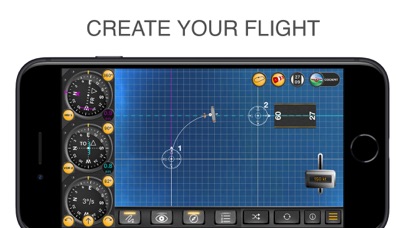
The instruments available are: VOR, RMI, HSI, EHSI, DME, Directional Gyro and airspeed indicator. Thanks to a NAV 1 and a NAV 2 modes, you will also be able to train for two NDB/VOR approaches.
Main features:
• COCKPIT/MAP - Use the cockpit mode to practice and use the map mode to set up a scenario and check you progress. Both the aircraft and ground stations can be easily relocated to a new position by dragging and dropping them.
• VOR, DME, HSI, EHSI, RMI - This aviation app is carefully designed to reflect the characteristics of different instruments. Choose between VOR or NDB navigation, select your instruments (HSI/EHSI or RMI) and a speed range up to 400 kts.
• APPROACH PROCEDURES - IFR Flight Trainer Simulator will help learn how to track a radial, how to intercept a radial outbound, inbound, how to fly a DME arc, and so on. It is the simplest way to learn the navigation procedures inside out!
• WIND - Have you become familiar with all the procedures? Add some wind to spice things up. The wind settings are displayed on separate screen, where you can set its direction and speed to increase the challenge.
• HOLDING - Set and practice standard or non-standard holding patterns. Test you skills with VOR or NDB fix holdings.
You already know where your next flight will happen? Build a scenario for it in the app to practice what awaits you in real life. This way you can practice your flight in a safe environment before facing the real challenge in the cockpit.
If you want to learn the essentials, take a look at the built-in tasks as well.
All features:
• Use the classic or glass cockpit mode to simulate what you see in a real aircraft
• Use the map mode to learn and understand the procedures from a third-person point of view
• Choose between VOR and NDB navigation
• Use the following, c