widget weather

widget weather Summary
widget weather is a mobile iOS app in Weather by Trond Rossvoll. Released in Oct 2014 (11 years ago). It has 277 ratings with a 4.57★ (excellent) average. Based on AppGoblin estimates, it reaches roughly 718 monthly active users . Store last updated Sep 10, 2026
widget weather SDKs Summary
App not yet scanned for SDKs.
4.57★
Ratings: 277
Screenshots



App Description
Even bad weather can be forecasted beautifully!
Works on your iPhone, iPad, Apple Watch and Mac!
-"I have tried every widget and this is by far the best. The pixelated weather animations are very cool. It has a ton of options and I like how you can double tap the widget to refresh the info." (New type widget does not support double tapping)
-"Maybe the best weather widget on the appstore."
-"It's simple, beautiful and does what it says."
-"LOVE THIS! Best weather app I've used so far!"
-“The app is great, I only ask that the application, on the iPad, can be viewed in landscape. Attach 5 Stars, but, when the landscape is ready, become 7 Stars. Congratulations!” (iPad now supports landscape mode)
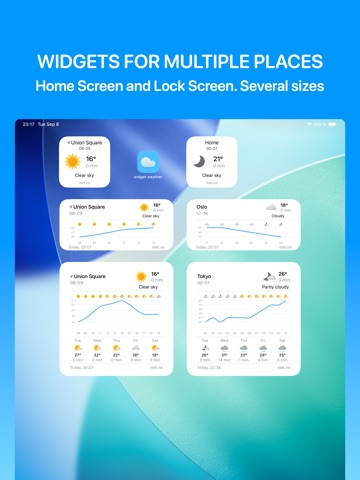
widget weather is a highly customizable weather app with widgets. Pick your favorite weather symbols, detail level, font and background color. There are even two weather forecast services so pick the most accurate one for your location.
On Apple Watch you can use swipe up/down or use the digital crown to travel through time on the current weather page. Tap the screen to go back to current weather.
Feature list:
-Touch responsive meteogram
-Two forecast styles: list and graph (meteogram)
-Customizable widgets
-Separate locations for widgets
-Apple Watch support
-19 beautiful weather icon sets
-2 animated weather symbol sets
-Customizable background
-Customizable detail level (rain/wind/units etc.)
-Font picker
-Forecast for map locations and GPS position
-Two forecast services: openweathermap.org and met.no
-Choose how often new forecast data should be downloaded
-Weather forecast in 49 languages
-Universal for iPhone and iPad and the iPad version can be installed on Mac and gives you weather widgets on your desktop
Usage tips:
-Touch and drag graph or tap list to show forecast details
-You can force update a location manually by double clicking the screen in the app
-To change the location for a widget: Long press a widget and choose “Edit widget”, then choose from a list of your locations. Add more locations from within the app before selecting them in a widget
###
Weather forecast from met.no available in: English, Arabic, Bulgarian, Catalan, Chinese Simplified, Chinese Traditional, Danish, Dutch, Finnish, French, German, Italian, Japanese, Korean, Norwegian, Polish, Portuguese, Romanian, Russian, Spanish, Swedish, Turkish and Ukrainian.
Weather fo