ProtoSketch – Graphic Design
ProtoSketch – Graphic Design Summary
ProtoSketch – Graphic Design is a mobile iOS app in Productivity by Codemotion. Released in Oct 2015 (10 years ago). Store last updated Oct 2, 2017
ProtoSketch – Graphic Design SDKs Summary
App not yet scanned for SDKs.
0★
Ratings:
Screenshots



App Description
Quite simply, the finest Desktop-Class design software ever released.
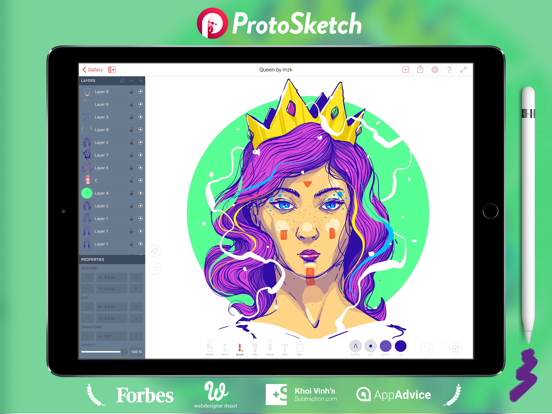
Make slick designs in minutes! You are a designer, a marketer or just want to sketch something, you want to make a logo or a new landing page for your business - ProtoSketch is your digital canvas!
You don't have to learn anything, just choose the brush and start sketching!
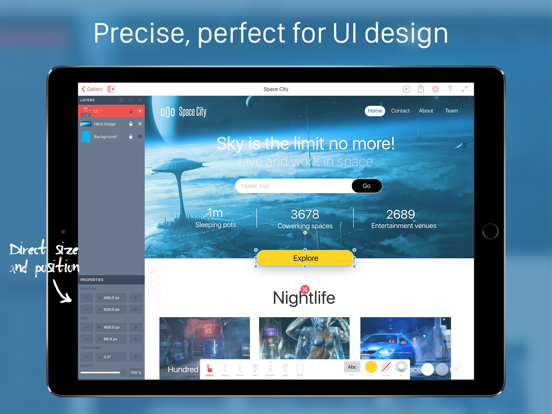
Supercharged with icons, fonts, ui elements, basic and complex drag and drop shapes. It is easy to design anything from logo and icon to website and mobile app. Lossless vector graphics that you can scale infinitely and continue on your desktop.
"ProtoSketch puts the "Pro" in iPad Pro!"
"Beautiful design in a thoughtful package."
"One of the best design tools you have to try in 2016"
WHAT MAKES THIS APP BETTER THAN OTHER DESIGN TOOLS ?
- Made with lots of LOVE by designers for designers!
- The iPad is not a PC. ProtoSketch wasn't adapted from a desktop app. It was created from the ground up exclusively for iPad. Our workflow is different - we have dedicated ALT, SHIFT and REPEAT buttons and all the commands relative to your selection appear as buttons on the bounding box. We call them shortcuts because they work as keyboard shortcuts on your PC.
-The app works beautifully with Apple Pencil you can draw, sketch and concept your ideas. But hey nothing will stop you from finishing your idea and polishing it to perfection. Proto has all the tools you need.
- AGILE, we are doing constant updates, enriching your experience and adding new features.
- HUGE ROADMAP, there is a lot of stuff ahead better vector tools, a mac app, prototyping, real-time collaboration and more...
- EXCELLENT Support, send us feedback on fb, tw and via email. We'd love to chat :)
WHAT CAN YOU CREATE?
- Sketches
- Concepts
- Vector Illustrations
- Design Logos
- Design App icons
- Design vector icons/pictograms
- Everything UI/UX
- Design Websites
- Design Apps
- Landing pages
- Sitemap flow charts
- Wireframes
- Use maps
- Send to desktop in vector format
FEATURES
- Vector Brush with Variable width (Apple Pencil support)
- Pencil Tool for smooth sketching and adding fills
- Pen Tool for drawing perfect vector paths
- Vector Eraser
- Scissors - for cutting vector paths
- Shape creation tools - rect, ellipse, line, polygon, star, spiral
- LAYERS
- EXACT size and position input
- Hardware Keyboard Shortcuts
- LIBRARY full of UI elements, icons, shapes and more vector elements
- Alt, Shift and Repeat buttons for fast workflows
- Swathes, color wheel, rgb and hsb sliders and HEX input
- Rotate and scale transform handles
- CMD buttons for