CRONO-MILLE-MIGLIA

CRONO-MILLE-MIGLIA Summary
CRONO-MILLE-MIGLIA is a with in-app purchases iOS app in Sports by Filippo Gozza. Released in Feb 2015 (11 years ago). Store metadata: updated May 18, 2026.
Store info: Last updated on App Store on May 18, 2026 .
0★
Ratings: 0
Screenshots


App Description
CRONO-MILLE-MIGLIA
This app is the only stopwatch for classic and sport oldtimer uniformity rally.
In a single app, the 7 most important applications for oldtimer rally are included:
1. Synchronized clock
2. a stopwatch with a split-precision of 1/100 second
3. countdown with a Split-precision of 1/100 second
with Beep or Speech in 3 languages (de, en, it)
4. trip-/twinmaster
5. speedmeter that shows you the average speed of the test
6. Speedpilot
7. Speedometer
1. Synchronized clock
The clock can be synchronized with GPS, atomic time or manual.
2. Stoppuhr-Modus
The stopwatch has the splitting function: each time you press the start-button, the stopwatch stops and starts all over again to count.
The result is recorded in a window and can be viewed afterwards.
You can also activate a beep for every second - it also works with a headset.
The reset-button resets the window with the results.
3. Countdown-Modus
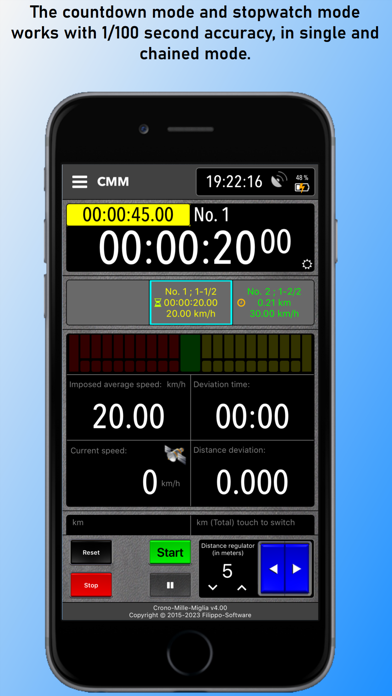
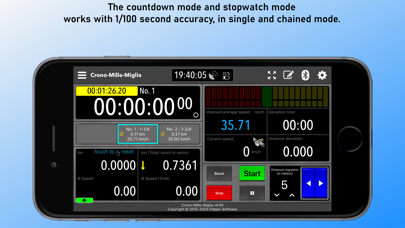
The countdown with 1/100 second accuracy, works at single and concatenated mode.
When you insert the time of the tests, you can define that the departure occurs automatically or manually.
Each time you press the start-button, the current countdown stops and the next one starts.
The result is recorded in a window and can be viewed afterwards.
The reset-button resets the results-window and reactivates the stored times.
You can enter different stages with different sectors so that the concatenated mode only from sector to sector.
After the last sector, the timer stops and the green button is disabled.
To reactivate the "Start" you press the "Stop".
4. Trip-/Twinmaster
The trip-/twinmaster, operating with activated GPS, indicates the speed of the entire mileage and trip odometer at every meter exactly (you can reset it with by touching the text "touch to reset").
In the countdown-mode is the text "touch to reset" invisible.
5. Speedmeter
The speedmeter can show you the average speed of navigation
from the 1st start and also from the current.
6. Speedpilot
Speedpilot indicates the average speed not only with nummeri but visually with a progress indicator.
7. Speedometer
Displays the current speed .
* GPS/GNSS
This app uses GNSS if it is supported by the device.
GNSS is a collective term for the use of existing global satellite systems such as: GPS, GLONASS, Galileo, Beidou.
* Distance measurement with wheel sensor (sensor-kit) or GPS
The a