Photo Compress - Shrink Pics

Photo Compress - Shrink Pics Summary
Photo Compress - Shrink Pics is a free, ad-supported, with in-app purchases iOS app in Photo And Video by Brachmann Online Marketing GmbH & Co. KG. Released in Mar 2015 (11 years ago). It has 36K ratings with a 4.65★ (excellent) average. Based on AppGoblin estimates, it reaches roughly 17K monthly active users and generates around $<10K monthly revenue (34% IAP / 66% ads). Store last updated Oct 15, 2026
Recent activity: 4.00 new ratings this week View trends →
SDK intelligence: AppGoblin detected 1 ad networks(e.g. Google) integrated into Photo Compress - Shrink Pics. View full SDK list →
Photo Compress - Shrink Pics SDKs Summary
Photo Compress - Shrink Pics was last scanned for SDKs on 2026-08-14. Below is the overview of third-party companies detected in the app. The full list of SDKs, permissions and unknowns is available here.
 Google
4.65★
Ratings: 36K
Screenshots




App Description
Simply shrink and compress photos to free up storage without noticeable quality loss. Download now for free!
A photo compressor and resizer for iOS on iPhone and iPad.
Is your iPhone/iPad storage almost full? Or do you want to reduce photo file size to send smaller pictures via WhatsApp or iMessage, or to post them on Facebook or Instagram? This app helps you compress photos, make them smaller, and free up space fast—while staying in control of quality.
Great for:
- Freeing up iPhone storage in minutes
- Sending smaller photos faster via WhatsApp/iMessage
- Converting HEIC to JPEG for better compatibility
Overview:
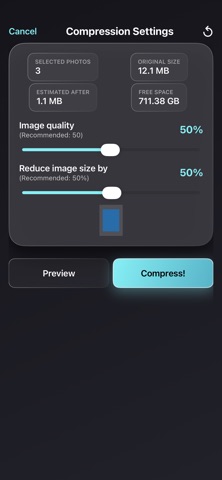
- Batch compress photos: single photos, multiple photos, or entire albums
- Adjust JPEG compression level
- Optionally resize images (choose the size reduction)
- Compress photos without resizing
- Preview to check image quality before saving
- See storage usage before and after compression
- Simple & intuitive
- Convert HEIC/HEIF photos to JPEG files
- Optional: Let the app delete the original photos so only the compressed versions remain. Please note: Deleted photos may still appear in the “Recently Deleted” album. Remove them there as well to truly free up storage.
Download now for free and save storage on your device!
Standard Apple Terms of Use (EULA): https://www.apple.com/legal/internet-services/itunes/dev/stdeula/